---
title: "TabRow"
description: "Fixed tabs display all tabs in a set simultaneously. They are best for switching between related
content quickly, such as between transportation methods in a map. To navigate between fixed tabs,
tap an individual tab, or swipe left or right in the content area."
type: "component"
social_image: "/static/images/material/fixed-tabs.png"
---
Composable Component
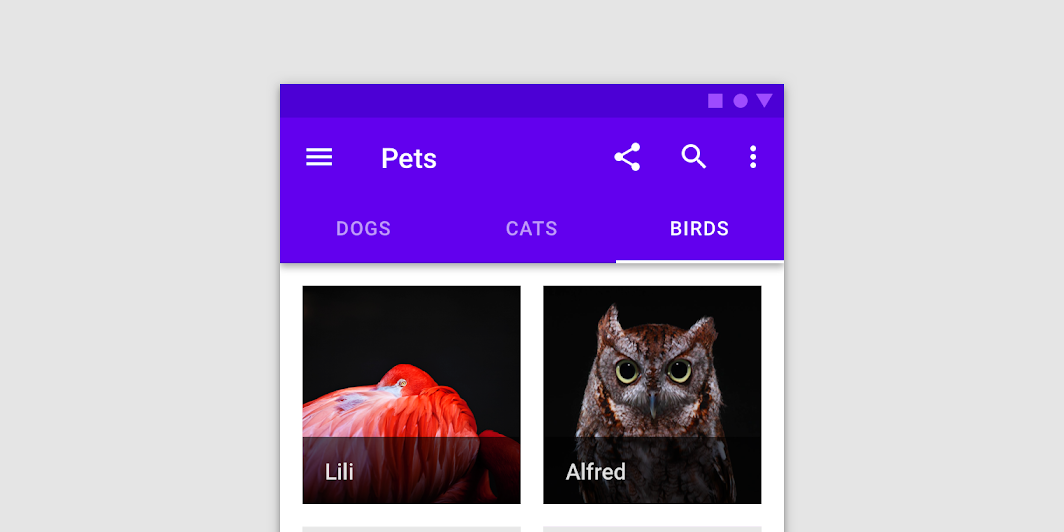
Fixed tabs display all tabs in a set simultaneously. They are best for switching between related
content quickly, such as between transportation methods in a map. To navigate between fixed tabs,
tap an individual tab, or swipe left or right in the content area.
Common
```kotlin
@Composable
fun TabRow(
selectedTabIndex: Int,
modifier: Modifier = Modifier,
backgroundColor: Color = MaterialTheme.colors.primarySurface,
contentColor: Color = contentColorFor(backgroundColor),
indicator: @Composable @UiComposable (tabPositions: List) -> Unit =
@Composable { tabPositions ->
TabRowDefaults.Indicator(Modifier.tabIndicatorOffset(tabPositions[selectedTabIndex]))
},
divider: @Composable @UiComposable () -> Unit = @Composable { TabRowDefaults.Divider() },
tabs: @Composable @UiComposable () -> Unit,
)
```
#### Parameters
| | |
| --- | --- |
| selectedTabIndex | the index of the currently selected tab |
| modifier | optional `Modifier` for this TabRow |
| backgroundColor | The background color for the TabRow. Use `Color.Transparent` to have no color. |
| contentColor | The preferred content color provided by this TabRow to its children. Defaults to either the matching content color for `backgroundColor`, or if `backgroundColor` is not a color from the theme, this will keep the same value set above this TabRow. |
| indicator | the indicator that represents which tab is currently selected. By default this will be a `TabRowDefaults.Indicator`, using a `TabRowDefaults.tabIndicatorOffset` modifier to animate its position. Note that this indicator will be forced to fill up the entire TabRow, so you should use `TabRowDefaults.tabIndicatorOffset` or similar to animate the actual drawn indicator inside this space, and provide an offset from the start. |
| divider | the divider displayed at the bottom of the TabRow. This provides a layer of separation between the TabRow and the content displayed underneath. |
| tabs | the tabs inside this TabRow. Typically this will be multiple `Tab`s. Each element inside this lambda will be measured and placed evenly across the TabRow, each taking up equal space. |
## Code Examples
### FancyAnimatedIndicator
```kotlin
@Composable
fun FancyAnimatedIndicator(tabPositions: List, selectedTabIndex: Int) {
val colors = listOf(Color.Yellow, Color.Red, Color.Green)
val transition = updateTransition(selectedTabIndex)
val indicatorStart by
transition.animateDp(
transitionSpec = {
// Handle directionality here, if we are moving to the right, we
// want the right side of the indicator to move faster, if we are
// moving to the left, we want the left side to move faster.
if (initialState < targetState) {
spring(dampingRatio = 1f, stiffness = 50f)
} else {
spring(dampingRatio = 1f, stiffness = 1000f)
}
}
) {
tabPositions[it].left
}
val indicatorEnd by
transition.animateDp(
transitionSpec = {
// Handle directionality here, if we are moving to the right, we
// want the right side of the indicator to move faster, if we are
// moving to the left, we want the left side to move faster.
if (initialState < targetState) {
spring(dampingRatio = 1f, stiffness = 1000f)
} else {
spring(dampingRatio = 1f, stiffness = 50f)
}
}
) {
tabPositions[it].right
}
val indicatorColor by transition.animateColor { colors[it % colors.size] }
FancyIndicator(
// Pass the current color to the indicator
indicatorColor,
modifier =
Modifier
// Fill up the entire TabRow, and place the indicator at the start
.fillMaxSize()
.wrapContentSize(align = Alignment.BottomStart)
// Apply an offset from the start to correctly position the indicator around the tab
.offset { IntOffset(indicatorStart.roundToPx(), 0) }
// Make the width of the indicator follow the animated width as we move between tabs
.width(indicatorEnd - indicatorStart),
)
}
```
### FancyIndicator
```kotlin
@Composable
fun FancyIndicator(color: Color, modifier: Modifier = Modifier) {
// Draws a rounded rectangular with border around the Tab, with a 5.dp padding from the edges
// Color is passed in as a parameter [color]
Box(
modifier
.padding(5.dp)
.fillMaxSize()
.border(BorderStroke(2.dp, color), RoundedCornerShape(5.dp))
)
}
```
### FancyIndicatorContainerTabs
```kotlin
@Composable
fun FancyIndicatorContainerTabs() {
var state by remember { mutableStateOf(0) }
val titles = listOf("TAB 1", "TAB 2", "TAB 3")
val indicator =
@Composable { tabPositions: List ->
FancyAnimatedIndicator(tabPositions = tabPositions, selectedTabIndex = state)
}
Column {
TabRow(selectedTabIndex = state, indicator = indicator) {
titles.forEachIndexed { index, title ->
Tab(text = { Text(title) }, selected = state == index, onClick = { state = index })
}
}
Text(
modifier = Modifier.align(Alignment.CenterHorizontally),
text = "Fancy transition tab ${state + 1} selected",
style = MaterialTheme.typography.body1,
)
}
}
```
### FancyIndicatorTabs
```kotlin
@Composable
fun FancyIndicatorTabs() {
var state by remember { mutableStateOf(0) }
val titles = listOf("TAB 1", "TAB 2", "TAB 3")
// Reuse the default offset animation modifier, but use our own indicator
val indicator =
@Composable { tabPositions: List ->
FancyIndicator(Color.White, Modifier.tabIndicatorOffset(tabPositions[state]))
}
Column {
TabRow(selectedTabIndex = state, indicator = indicator) {
titles.forEachIndexed { index, title ->
Tab(text = { Text(title) }, selected = state == index, onClick = { state = index })
}
}
Text(
modifier = Modifier.align(Alignment.CenterHorizontally),
text = "Fancy indicator tab ${state + 1} selected",
style = MaterialTheme.typography.body1,
)
}
}
```
### FancyTab
```kotlin
@Composable
fun FancyTab(title: String, onClick: () -> Unit, selected: Boolean) {
Tab(selected, onClick) {
Column(
Modifier.padding(10.dp).height(50.dp).fillMaxWidth(),
verticalArrangement = Arrangement.SpaceBetween,
) {
Box(
Modifier.size(10.dp)
.align(Alignment.CenterHorizontally)
.background(color = if (selected) Color.Red else Color.White)
)
Text(
text = title,
style = MaterialTheme.typography.body1,
modifier = Modifier.align(Alignment.CenterHorizontally),
)
}
}
}
```
### FancyTabs
```kotlin
@Composable
fun FancyTabs() {
var state by remember { mutableStateOf(0) }
val titles = listOf("TAB 1", "TAB 2", "TAB 3")
Column {
TabRow(selectedTabIndex = state) {
titles.forEachIndexed { index, title ->
FancyTab(title = title, onClick = { state = index }, selected = (index == state))
}
}
Text(
modifier = Modifier.align(Alignment.CenterHorizontally),
text = "Fancy tab ${state + 1} selected",
style = MaterialTheme.typography.body1,
)
}
}
```
### TextTabs
```kotlin
@Composable
fun TextTabs() {
var state by remember { mutableStateOf(0) }
val titles = listOf("TAB 1", "TAB 2", "TAB 3 WITH LOTS OF TEXT")
Column {
TabRow(selectedTabIndex = state) {
titles.forEachIndexed { index, title ->
Tab(text = { Text(title) }, selected = state == index, onClick = { state = index })
}
}
Text(
modifier = Modifier.align(Alignment.CenterHorizontally),
text = "Text tab ${state + 1} selected",
style = MaterialTheme.typography.body1,
)
}
}
```