Composable Component
The top app bar displays information and actions relating to the current screen.
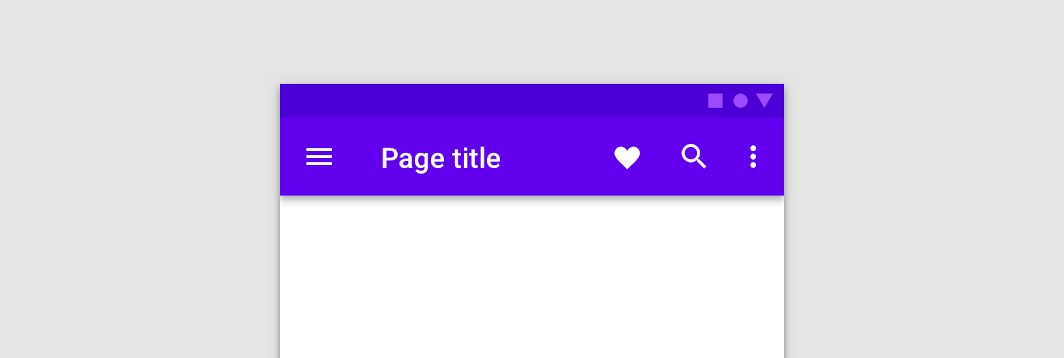
TopAppBar
Common
```kotlin
@Composable
fun TopAppBar(
title: @Composable () -> Unit,
windowInsets: WindowInsets,
modifier: Modifier = Modifier,
navigationIcon: @Composable (() -> Unit)? = null,
actions: @Composable RowScope.() -> Unit = {},
backgroundColor: Color = MaterialTheme.colors.primarySurface,
contentColor: Color = contentColorFor(backgroundColor),
elevation: Dp = AppBarDefaults.TopAppBarElevation,
)
```
#### Parameters
| | |
| --- | --- |
| title | The title to be displayed in the center of the TopAppBar |
| windowInsets | a window insets that app bar will respect. |
| modifier | The `Modifier` to be applied to this TopAppBar |
| navigationIcon | The navigation icon displayed at the start of the TopAppBar. This should typically be an `IconButton` or `IconToggleButton`. |
| actions | The actions displayed at the end of the TopAppBar. This should typically be `IconButton`s. The default layout here is a `Row`, so icons inside will be placed horizontally. |
| backgroundColor | The background color for the TopAppBar. Use `Color.Transparent` to have no color. |
| contentColor | The preferred content color provided by this TopAppBar to its children. Defaults to either the matching content color for `backgroundColor`, or if `backgroundColor` is not a color from the theme, this will keep the same value set above this TopAppBar. |
| elevation | the elevation of this TopAppBar. |
TopAppBar
Common
```kotlin
@Composable
fun TopAppBar(
title: @Composable () -> Unit,
modifier: Modifier = Modifier,
navigationIcon: @Composable (() -> Unit)? = null,
actions: @Composable RowScope.() -> Unit = {},
backgroundColor: Color = MaterialTheme.colors.primarySurface,
contentColor: Color = contentColorFor(backgroundColor),
elevation: Dp = AppBarDefaults.TopAppBarElevation,
)
```
#### Parameters
| | |
| --- | --- |
| title | The title to be displayed in the center of the TopAppBar |
| modifier | The `Modifier` to be applied to this TopAppBar |
| navigationIcon | The navigation icon displayed at the start of the TopAppBar. This should typically be an `IconButton` or `IconToggleButton`. |
| actions | The actions displayed at the end of the TopAppBar. This should typically be `IconButton`s. The default layout here is a `Row`, so icons inside will be placed horizontally. |
| backgroundColor | The background color for the TopAppBar. Use `Color.Transparent` to have no color. |
| contentColor | The preferred content color provided by this TopAppBar to its children. Defaults to either the matching content color for `backgroundColor`, or if `backgroundColor` is not a color from the theme, this will keep the same value set above this TopAppBar. |
| elevation | the elevation of this TopAppBar. |
TopAppBar
Common
```kotlin
@Composable
fun TopAppBar(
windowInsets: WindowInsets,
modifier: Modifier = Modifier,
backgroundColor: Color = MaterialTheme.colors.primarySurface,
contentColor: Color = contentColorFor(backgroundColor),
elevation: Dp = AppBarDefaults.TopAppBarElevation,
contentPadding: PaddingValues = AppBarDefaults.ContentPadding,
content: @Composable RowScope.() -> Unit,
)
```
#### Parameters
| | |
| --- | --- |
| windowInsets | a window insets that app bar will respect. |
| modifier | The `Modifier` to be applied to this TopAppBar |
| backgroundColor | The background color for the TopAppBar. Use `Color.Transparent` to have no color. |
| contentColor | The preferred content color provided by this TopAppBar to its children. Defaults to either the matching content color for `backgroundColor`, or if `backgroundColor` is not a color from the theme, this will keep the same value set above this TopAppBar. |
| elevation | the elevation of this TopAppBar. |
| contentPadding | the padding applied to the content of this TopAppBar |
| content | the content of this TopAppBar.The default layout here is a `Row`, so content inside will be placed horizontally. |
TopAppBar
Common
```kotlin
@Composable
fun TopAppBar(
modifier: Modifier = Modifier,
backgroundColor: Color = MaterialTheme.colors.primarySurface,
contentColor: Color = contentColorFor(backgroundColor),
elevation: Dp = AppBarDefaults.TopAppBarElevation,
contentPadding: PaddingValues = AppBarDefaults.ContentPadding,
content: @Composable RowScope.() -> Unit,
)
```
#### Parameters
| | |
| --- | --- |
| modifier | The `Modifier` to be applied to this TopAppBar |
| backgroundColor | The background color for the TopAppBar. Use `Color.Transparent` to have no color. |
| contentColor | The preferred content color provided by this TopAppBar to its children. Defaults to either the matching content color for `backgroundColor`, or if `backgroundColor` is not a color from the theme, this will keep the same value set above this TopAppBar. |
| elevation | the elevation of this TopAppBar. |
| contentPadding | the padding applied to the content of this TopAppBar |
| content | the content of this TopAppBar.The default layout here is a `Row`, so content inside will be placed horizontally. |