Composable Component
A bottom app bar displays navigation and key actions at the bottom of small screens.
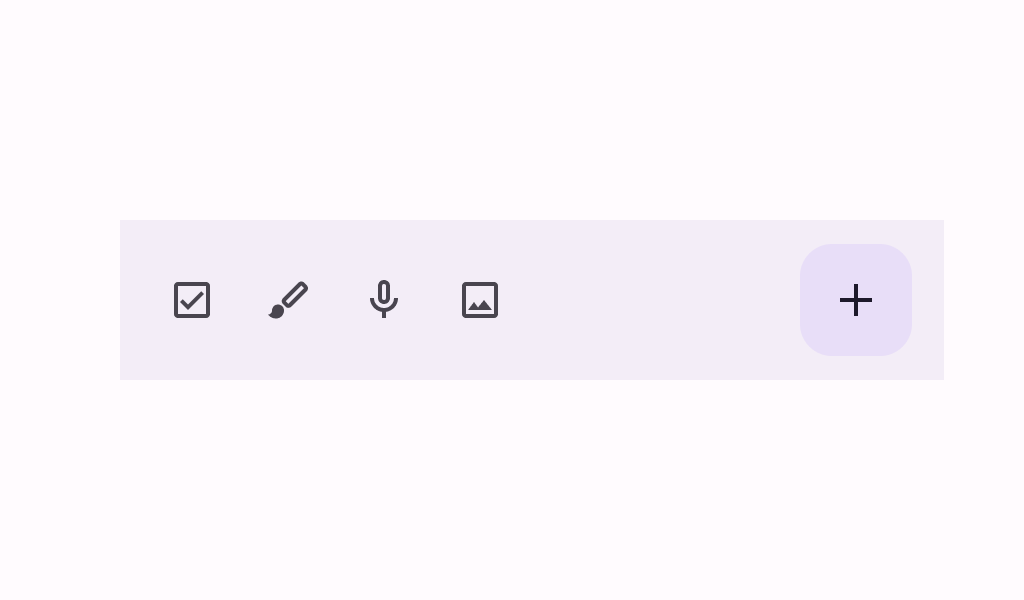
BottomAppBar
Common
```kotlin
@Composable
fun BottomAppBar(
actions: @Composable RowScope.() -> Unit,
modifier: Modifier = Modifier,
floatingActionButton: @Composable (() -> Unit)? = null,
containerColor: Color = BottomAppBarDefaults.containerColor,
contentColor: Color = contentColorFor(containerColor),
tonalElevation: Dp = BottomAppBarDefaults.ContainerElevation,
contentPadding: PaddingValues = BottomAppBarDefaults.ContentPadding,
windowInsets: WindowInsets = BottomAppBarDefaults.windowInsets,
) =
BottomAppBar(
actions = actions,
modifier = modifier,
floatingActionButton = floatingActionButton,
containerColor = containerColor,
contentColor = contentColor,
tonalElevation = tonalElevation,
contentPadding = contentPadding,
windowInsets = windowInsets,
scrollBehavior = null,
)
```
#### Parameters
| | |
| --- | --- |
| actions | the icon content of this BottomAppBar. The default layout here is a `Row`, so content inside will be placed horizontally. |
| modifier | the `Modifier` to be applied to this BottomAppBar |
| floatingActionButton | optional floating action button at the end of this BottomAppBar |
| containerColor | the color used for the background of this BottomAppBar. Use `Color.Transparent` to have no color. |
| contentColor | the preferred color for content inside this BottomAppBar. Defaults to either the matching content color for `containerColor`, or to the current `LocalContentColor` if `containerColor` is not a color from the theme. |
| tonalElevation | when `containerColor` is `ColorScheme.surface`, a translucent primary color overlay is applied on top of the container. A higher tonal elevation value will result in a darker color in light theme and lighter color in dark theme. See also: `Surface`. |
| contentPadding | the padding applied to the content of this BottomAppBar |
| windowInsets | a window insets that app bar will respect. |
BottomAppBar
Common
```kotlin
@ExperimentalMaterial3Api
@Composable
fun BottomAppBar(
actions: @Composable RowScope.() -> Unit,
modifier: Modifier = Modifier,
floatingActionButton: @Composable (() -> Unit)? = null,
containerColor: Color = BottomAppBarDefaults.containerColor,
contentColor: Color = contentColorFor(containerColor),
tonalElevation: Dp = BottomAppBarDefaults.ContainerElevation,
contentPadding: PaddingValues = BottomAppBarDefaults.ContentPadding,
windowInsets: WindowInsets = BottomAppBarDefaults.windowInsets,
scrollBehavior: BottomAppBarScrollBehavior? = null,
) =
BottomAppBar(
modifier = modifier,
containerColor = containerColor,
contentColor = contentColor,
tonalElevation = tonalElevation,
windowInsets = windowInsets,
contentPadding = contentPadding,
scrollBehavior = scrollBehavior,
) {
Row(
modifier = Modifier.weight(1f),
horizontalArrangement = Arrangement.Start,
verticalAlignment = Alignment.CenterVertically,
content = actions,
)
if (floatingActionButton != null) {
Box(
Modifier.fillMaxHeight()
.padding(top = FABVerticalPadding, end = FABHorizontalPadding),
contentAlignment = Alignment.TopStart,
) {
floatingActionButton()
}
}
}
```
#### Parameters
| | |
| --- | --- |
| actions | the icon content of this BottomAppBar. The default layout here is a `Row`, so content inside will be placed horizontally. |
| modifier | the `Modifier` to be applied to this BottomAppBar |
| floatingActionButton | optional floating action button at the end of this BottomAppBar |
| containerColor | the color used for the background of this BottomAppBar. Use `Color.Transparent` to have no color. |
| contentColor | the preferred color for content inside this BottomAppBar. Defaults to either the matching content color for `containerColor`, or to the current `LocalContentColor` if `containerColor` is not a color from the theme. |
| tonalElevation | when `containerColor` is `ColorScheme.surface`, a translucent primary color overlay is applied on top of the container. A higher tonal elevation value will result in a darker color in light theme and lighter color in dark theme. See also: `Surface`. |
| contentPadding | the padding applied to the content of this BottomAppBar |
| windowInsets | a window insets that app bar will respect. |
| scrollBehavior | a `BottomAppBarScrollBehavior` which holds various offset values that will be applied by this bottom app bar to set up its height. A scroll behavior is designed to work in conjunction with a scrolled content to change the bottom app bar appearance as the content scrolls. Note that the bottom app bar will not react to scrolling in case a touch exploration service (e.g., TalkBack) is active. See `BottomAppBarScrollBehavior.nestedScrollConnection`. |
BottomAppBar
Common
```kotlin
@Composable
fun BottomAppBar(
modifier: Modifier = Modifier,
containerColor: Color = BottomAppBarDefaults.containerColor,
contentColor: Color = contentColorFor(containerColor),
tonalElevation: Dp = BottomAppBarDefaults.ContainerElevation,
contentPadding: PaddingValues = BottomAppBarDefaults.ContentPadding,
windowInsets: WindowInsets = BottomAppBarDefaults.windowInsets,
content: @Composable RowScope.() -> Unit,
) =
BottomAppBar(
modifier = modifier,
containerColor = containerColor,
contentColor = contentColor,
tonalElevation = tonalElevation,
contentPadding = contentPadding,
windowInsets = windowInsets,
scrollBehavior = null,
content = content,
)
```
#### Parameters
| | |
| --- | --- |
| modifier | the `Modifier` to be applied to this BottomAppBar |
| containerColor | the color used for the background of this BottomAppBar. Use `Color.Transparent` to have no color. |
| contentColor | the preferred color for content inside this BottomAppBar. Defaults to either the matching content color for `containerColor`, or to the current `LocalContentColor` if `containerColor` is not a color from the theme. |
| tonalElevation | when `containerColor` is `ColorScheme.surface`, a translucent primary color overlay is applied on top of the container. A higher tonal elevation value will result in a darker color in light theme and lighter color in dark theme. See also: `Surface`. |
| contentPadding | the padding applied to the content of this BottomAppBar |
| windowInsets | a window insets that app bar will respect. |
| content | the content of this BottomAppBar. The default layout here is a `Row`, so content inside will be placed horizontally. |
BottomAppBar
Common
```kotlin
@ExperimentalMaterial3Api
@Composable
fun BottomAppBar(
modifier: Modifier = Modifier,
containerColor: Color = BottomAppBarDefaults.containerColor,
contentColor: Color = contentColorFor(containerColor),
tonalElevation: Dp = BottomAppBarDefaults.ContainerElevation,
contentPadding: PaddingValues = BottomAppBarDefaults.ContentPadding,
windowInsets: WindowInsets = BottomAppBarDefaults.windowInsets,
scrollBehavior: BottomAppBarScrollBehavior? = null,
content: @Composable RowScope.() -> Unit,
)
```
#### Parameters
| | |
| --- | --- |
| modifier | the `Modifier` to be applied to this BottomAppBar |
| containerColor | the color used for the background of this BottomAppBar. Use `Color.Transparent` to have no color. |
| contentColor | the preferred color for content inside this BottomAppBar. Defaults to either the matching content color for `containerColor`, or to the current `LocalContentColor` if `containerColor` is not a color from the theme. |
| tonalElevation | when `containerColor` is `ColorScheme.surface`, a translucent primary color overlay is applied on top of the container. A higher tonal elevation value will result in a darker color in light theme and lighter color in dark theme. See also: `Surface`. |
| contentPadding | the padding applied to the content of this BottomAppBar |
| windowInsets | a window insets that app bar will respect. |
| scrollBehavior | a `BottomAppBarScrollBehavior` which holds various offset values that will be applied by this bottom app bar to set up its height. A scroll behavior is designed to work in conjunction with a scrolled content to change the bottom app bar appearance as the content scrolls. Note that the bottom app bar will not react to scrolling in case a touch exploration service (e.g., TalkBack) is active. See `BottomAppBarScrollBehavior.nestedScrollConnection`. |
| content | the content of this BottomAppBar. The default layout here is a `Row`, so content inside will be placed horizontally. |