---
title: "DropdownMenuItem"
description: "Menus display a list of choices on a temporary surface. They appear when users interact with a
button, action, or other control."
type: "component"
social_image: "/static/images/material3/menu.png"
---
Composable Component
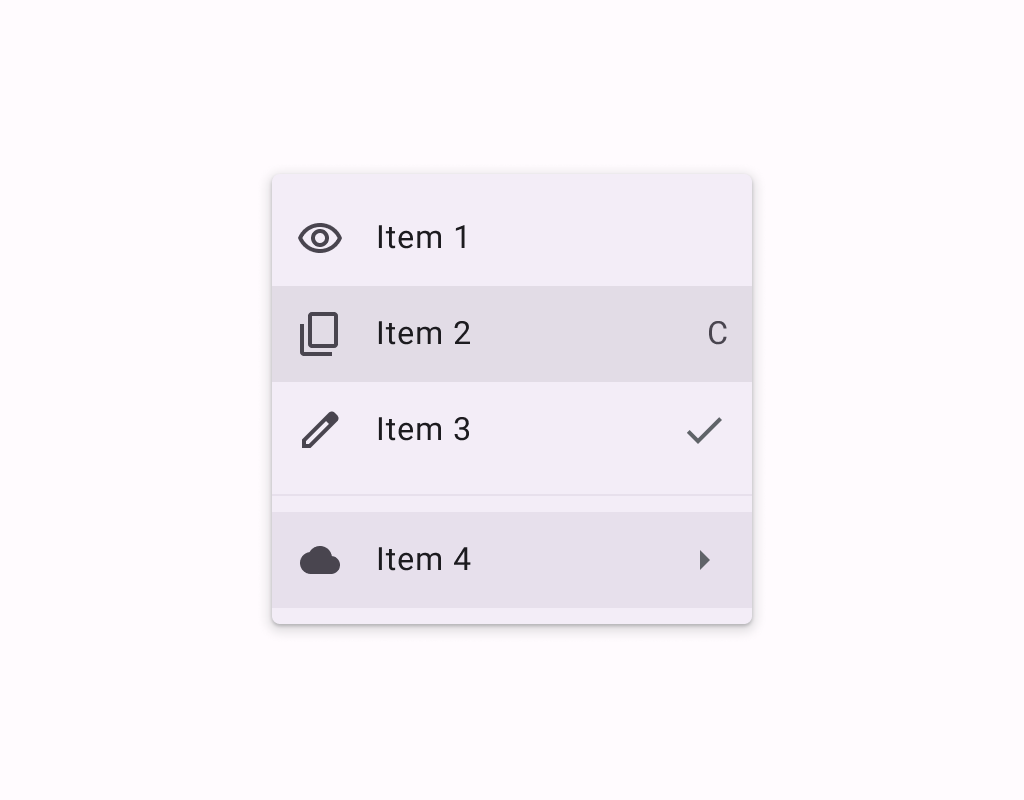
Menus display a list of choices on a temporary surface. They appear when users interact with a
button, action, or other control.
Common
```kotlin
@Composable
expect fun DropdownMenuItem(
text: @Composable () -> Unit,
onClick: () -> Unit,
modifier: Modifier = Modifier,
leadingIcon: @Composable (() -> Unit)? = null,
trailingIcon: @Composable (() -> Unit)? = null,
enabled: Boolean = true,
colors: MenuItemColors = MenuDefaults.itemColors(),
contentPadding: PaddingValues = MenuDefaults.DropdownMenuItemContentPadding,
interactionSource: MutableInteractionSource? = null,
)
```
#### Parameters
| | |
| --- | --- |
| text | text of the menu item |
| onClick | called when this menu item is clicked |
| modifier | the `Modifier` to be applied to this menu item |
| leadingIcon | optional leading icon to be displayed at the beginning of the item's text |
| trailingIcon | optional trailing icon to be displayed at the end of the item's text. This trailing icon slot can also accept `Text` to indicate a keyboard shortcut. |
| enabled | controls the enabled state of this menu item. When `false`, this component will not respond to user input, and it will appear visually disabled and disabled to accessibility services. |
| colors | `MenuItemColors` that will be used to resolve the colors used for this menu item in different states. See `MenuDefaults.itemColors`. |
| contentPadding | the padding applied to the content of this menu item |
| interactionSource | an optional hoisted `MutableInteractionSource` for observing and emitting `Interaction`s for this menu item. You can use this to change the menu item's appearance or preview the menu item in different states. Note that if `null` is provided, interactions will still happen internally. |
Common
> **Deprecated** Maintained for binary compatibility.
```kotlin
@ExperimentalMaterial3ExpressiveApi
@Composable
fun DropdownMenuItem(
onClick: () -> Unit,
text: @Composable () -> Unit,
shape: Shape,
modifier: Modifier = Modifier,
leadingIcon: @Composable (() -> Unit)? = null,
trailingIcon: @Composable (() -> Unit)? = null,
enabled: Boolean = true,
colors: MenuItemColors = MenuDefaults.itemColors(),
contentPadding: PaddingValues = MenuDefaults.DropdownMenuItemContentPadding,
interactionSource: MutableInteractionSource? = null,
) =
DropdownMenuItem(
onClick = onClick,
text = text,
shape = shape,
modifier = modifier,
supportingText = null,
leadingIcon = leadingIcon,
trailingIcon = trailingIcon,
enabled = enabled,
colors = colors,
contentPadding = contentPadding,
interactionSource = interactionSource,
)
```
#### Parameters
| | |
| --- | --- |
| onClick | called when this menu item is clicked |
| text | text of the menu item. |
| shape | `Shape` of this menu item. The shapes provided should be determined by the number of items in the group or menu as well as the item's position in the menu. Please use `MenuDefaults.leadingItemShape` for the first item in a list, `MenuDefaults.middleItemShape` for the middle items in a list, and `MenuDefaults.trailingItemShape` for the last item in a list. |
| modifier | the `Modifier` to be applied to this menu item. |
| leadingIcon | optional leading icon to be displayed when the item is unchecked. |
| trailingIcon | optional trailing icon to be displayed at the end of the item's text. |
| enabled | controls the enabled state of this menu item. When `false`, this component will not respond to user input. |
| colors | `MenuItemColors` that will be used to resolve the colors for this menu item. |
| contentPadding | the padding applied to the content of this menu item. |
| interactionSource | an optional hoisted `MutableInteractionSource` for observing and emitting `Interaction`s for this menu item. |
Common
```kotlin
@ExperimentalMaterial3ExpressiveApi
@Composable
fun DropdownMenuItem(
onClick: () -> Unit,
text: @Composable () -> Unit,
shape: Shape,
modifier: Modifier = Modifier,
leadingIcon: @Composable (() -> Unit)? = null,
trailingIcon: @Composable (() -> Unit)? = null,
enabled: Boolean = true,
colors: MenuItemColors = MenuDefaults.itemColors(),
contentPadding: PaddingValues = MenuDefaults.DropdownMenuSelectableItemContentPadding,
interactionSource: MutableInteractionSource? = null,
supportingText: @Composable (() -> Unit)? = null,
)
```
#### Parameters
| | |
| --- | --- |
| onClick | called when this menu item is clicked |
| text | text of the menu item. |
| shape | `Shape` of this menu item. The shapes provided should be determined by the number of items in the group or menu as well as the item's position in the menu. Please use `MenuDefaults.leadingItemShape` for the first item in a list, `MenuDefaults.middleItemShape` for the middle items in a list, and `MenuDefaults.trailingItemShape` for the last item in a list. |
| modifier | the `Modifier` to be applied to this menu item. |
| leadingIcon | optional leading icon to be displayed when the item is unchecked. |
| trailingIcon | optional trailing icon to be displayed at the end of the item's text. |
| enabled | controls the enabled state of this menu item. When `false`, this component will not respond to user input. |
| colors | `MenuItemColors` that will be used to resolve the colors for this menu item. |
| contentPadding | the padding applied to the content of this menu item. |
| interactionSource | an optional hoisted `MutableInteractionSource` for observing and emitting `Interaction`s for this menu item. |
| supportingText | optional supporting text of the menu item. |
Common
> **Deprecated** Maintained for binary compatibility.
```kotlin
@ExperimentalMaterial3ExpressiveApi
@Composable
fun DropdownMenuItem(
checked: Boolean,
onCheckedChange: (Boolean) -> Unit,
text: @Composable () -> Unit,
shapes: MenuItemShapes,
modifier: Modifier = Modifier,
leadingIcon: @Composable (() -> Unit)? = null,
checkedLeadingIcon: @Composable (() -> Unit)? = null,
trailingIcon: @Composable (() -> Unit)? = null,
enabled: Boolean = true,
colors: MenuItemColors = MenuDefaults.selectableItemColors(),
contentPadding: PaddingValues = MenuDefaults.DropdownMenuSelectableItemContentPadding,
interactionSource: MutableInteractionSource? = null,
) =
DropdownMenuItem(
checked = checked,
onCheckedChange = onCheckedChange,
text = text,
shapes = shapes,
modifier = modifier,
supportingText = null,
leadingIcon = leadingIcon,
trailingIcon = trailingIcon,
checkedLeadingIcon = checkedLeadingIcon,
enabled = enabled,
colors = colors,
contentPadding = contentPadding,
interactionSource = interactionSource,
)
```
#### Parameters
| | |
| --- | --- |
| checked | whether this menu item is currently checked. |
| onCheckedChange | called when this menu item is clicked, with the new checked state. |
| text | text of the menu item. |
| shapes | `MenuItemShapes` that will be used to resolve the shapes for this menu item. The shape of this item is determined by the value of `checked`. The shapes provided should be determined by the number of items in the group or menu as well as the item's position in the menu. There is a convenience function that can be used to easily determine the shape to be used at `MenuDefaults.itemShape` |
| modifier | the `Modifier` to be applied to this menu item. |
| leadingIcon | optional leading icon to be displayed when the item is unchecked. |
| checkedLeadingIcon | optional leading icon to be displayed when the item is checked. |
| trailingIcon | optional trailing icon to be displayed at the end of the item's text. |
| enabled | controls the enabled state of this menu item. When `false`, this component will not respond to user input. |
| colors | `MenuItemColors` that will be used to resolve the colors for this menu item. There are two predefined `MenuItemColors` at `MenuDefaults.selectableItemColors` and `MenuDefaults.selectableItemVibrantColors` which you can use or modify. |
| contentPadding | the padding applied to the content of this menu item. |
| interactionSource | an optional hoisted `MutableInteractionSource` for observing and emitting `Interaction`s for this menu item. |
Common
```kotlin
@ExperimentalMaterial3ExpressiveApi
@Composable
fun DropdownMenuItem(
checked: Boolean,
onCheckedChange: (Boolean) -> Unit,
text: @Composable () -> Unit,
shapes: MenuItemShapes,
modifier: Modifier = Modifier,
leadingIcon: @Composable (() -> Unit)? = null,
checkedLeadingIcon: @Composable (() -> Unit)? = null,
trailingIcon: @Composable (() -> Unit)? = null,
enabled: Boolean = true,
colors: MenuItemColors = MenuDefaults.selectableItemColors(),
contentPadding: PaddingValues = MenuDefaults.DropdownMenuSelectableItemContentPadding,
interactionSource: MutableInteractionSource? = null,
supportingText: @Composable (() -> Unit)? = null,
)
```
#### Parameters
| | |
| --- | --- |
| checked | whether this menu item is currently checked. |
| onCheckedChange | called when this menu item is clicked, with the new checked state. |
| text | text of the menu item. |
| shapes | `MenuItemShapes` that will be used to resolve the shapes for this menu item. The shape of this item is determined by the value of `checked`. The shapes provided should be determined by the number of items in the group or menu as well as the item's position in the menu. There is a convenience function that can be used to easily determine the shape to be used at `MenuDefaults.itemShape` |
| modifier | the `Modifier` to be applied to this menu item. |
| leadingIcon | optional leading icon to be displayed when the item is unchecked. |
| checkedLeadingIcon | optional leading icon to be displayed when the item is checked. |
| trailingIcon | optional trailing icon to be displayed at the end of the item's text. |
| enabled | controls the enabled state of this menu item. When `false`, this component will not respond to user input. |
| colors | `MenuItemColors` that will be used to resolve the colors for this menu item. There are two predefined `MenuItemColors` at `MenuDefaults.selectableItemColors` and `MenuDefaults.selectableItemVibrantColors` which you can use or modify. |
| contentPadding | the padding applied to the content of this menu item. |
| interactionSource | an optional hoisted `MutableInteractionSource` for observing and emitting `Interaction`s for this menu item. |
| supportingText | optional supporting text of the menu item. |
Common
> **Deprecated** Maintained for binary compatibility.
```kotlin
@ExperimentalMaterial3ExpressiveApi
@Composable
fun DropdownMenuItem(
selected: Boolean,
onClick: () -> Unit,
text: @Composable () -> Unit,
shapes: MenuItemShapes,
modifier: Modifier = Modifier,
leadingIcon: @Composable (() -> Unit)? = null,
checkedLeadingIcon: @Composable (() -> Unit)? = null,
trailingIcon: @Composable (() -> Unit)? = null,
enabled: Boolean = true,
colors: MenuItemColors = MenuDefaults.selectableItemColors(),
contentPadding: PaddingValues = MenuDefaults.DropdownMenuSelectableItemContentPadding,
interactionSource: MutableInteractionSource? = null,
) =
DropdownMenuItem(
selected = selected,
onClick = onClick,
text = text,
shapes = shapes,
modifier = modifier,
supportingText = null,
leadingIcon = leadingIcon,
trailingIcon = trailingIcon,
selectedLeadingIcon = checkedLeadingIcon,
enabled = enabled,
colors = colors,
contentPadding = contentPadding,
interactionSource = interactionSource,
)
```
#### Parameters
| | |
| --- | --- |
| selected | whether this menu item is currently selected. |
| onClick | called when this menu item is clicked. |
| text | text of the menu item. |
| shapes | `MenuItemShapes` that will be used to resolve the shapes for this menu item. The shape of this item is determined by the value of `selected`. The shapes provided should be determined by the number of items in the group or menu as well as the item's position in the menu. There is a convenience function that can be used to easily determine the shape to be used at `MenuDefaults.itemShape` |
| modifier | the `Modifier` to be applied to this menu item. |
| leadingIcon | optional leading icon to be displayed when the item is unchecked. |
| checkedLeadingIcon | optional leading icon to be displayed when the item is checked. |
| trailingIcon | optional trailing icon to be displayed at the end of the item's text. |
| enabled | controls the enabled state of this menu item. When `false`, this component will not respond to user input. |
| colors | `MenuItemColors` that will be used to resolve the colors for this menu item. There are two predefined `MenuItemColors` at `MenuDefaults.selectableItemColors` and `MenuDefaults.selectableItemVibrantColors` which you can use or modify. |
| contentPadding | the padding applied to the content of this menu item. |
| interactionSource | an optional hoisted `MutableInteractionSource` for observing and emitting `Interaction`s for this menu item. |
Common
```kotlin
@ExperimentalMaterial3ExpressiveApi
@Composable
fun DropdownMenuItem(
selected: Boolean,
onClick: () -> Unit,
text: @Composable () -> Unit,
shapes: MenuItemShapes,
modifier: Modifier = Modifier,
leadingIcon: @Composable (() -> Unit)? = null,
selectedLeadingIcon: @Composable (() -> Unit)? = null,
trailingIcon: @Composable (() -> Unit)? = null,
enabled: Boolean = true,
colors: MenuItemColors = MenuDefaults.selectableItemColors(),
contentPadding: PaddingValues = MenuDefaults.DropdownMenuSelectableItemContentPadding,
interactionSource: MutableInteractionSource? = null,
supportingText: @Composable (() -> Unit)? = null,
)
```
#### Parameters
| | |
| --- | --- |
| selected | whether this menu item is currently selected. |
| onClick | called when this menu item is clicked. |
| text | text of the menu item. |
| shapes | `MenuItemShapes` that will be used to resolve the shapes for this menu item. The shape of this item is determined by the value of `selected`. The shapes provided should be determined by the number of items in the group or menu as well as the item's position in the menu. There is a convenience function that can be used to easily determine the shape to be used at `MenuDefaults.itemShape` |
| modifier | the `Modifier` to be applied to this menu item. |
| leadingIcon | optional leading icon to be displayed when the item is unchecked. |
| selectedLeadingIcon | optional leading icon to be displayed when the item is selected. |
| trailingIcon | optional trailing icon to be displayed at the end of the item's text. |
| enabled | controls the enabled state of this menu item. When `false`, this component will not respond to user input. |
| colors | `MenuItemColors` that will be used to resolve the colors for this menu item. There are two predefined `MenuItemColors` at `MenuDefaults.selectableItemColors` and `MenuDefaults.selectableItemVibrantColors` which you can use or modify. |
| contentPadding | the padding applied to the content of this menu item. |
| interactionSource | an optional hoisted `MutableInteractionSource` for observing and emitting `Interaction`s for this menu item. |
| supportingText | optional supporting text of the menu item. |
Android
```kotlin
@Composable
actual fun DropdownMenuItem(
text: @Composable () -> Unit,
onClick: () -> Unit,
modifier: Modifier,
leadingIcon: @Composable (() -> Unit)?,
trailingIcon: @Composable (() -> Unit)?,
enabled: Boolean,
colors: MenuItemColors,
contentPadding: PaddingValues,
interactionSource: MutableInteractionSource?,
)
```
## Code Examples
### ExposedDropdownMenuSample
```kotlin
@OptIn(ExperimentalMaterial3ExpressiveApi::class)
@Preview
@Composable
fun ExposedDropdownMenuSample() {
val options: List = SampleData.take(5)
var expanded by remember { mutableStateOf(false) }
val textFieldState = rememberTextFieldState(options[0])
var checkedIndex: Int? by remember { mutableStateOf(null) }
ExposedDropdownMenuBox(expanded = expanded, onExpandedChange = { expanded = it }) {
TextField(
// The `menuAnchor` modifier must be passed to the text field to handle
// expanding/collapsing the menu on click. A read-only text field has
// the anchor type `PrimaryNotEditable`.
modifier = Modifier.menuAnchor(ExposedDropdownMenuAnchorType.PrimaryNotEditable),
state = textFieldState,
readOnly = true,
lineLimits = TextFieldLineLimits.SingleLine,
label = { Text("Label") },
trailingIcon = { ExposedDropdownMenuDefaults.TrailingIcon(expanded = expanded) },
colors = ExposedDropdownMenuDefaults.textFieldColors(),
)
ExposedDropdownMenu(
expanded = expanded,
onDismissRequest = { expanded = false },
containerColor = MenuDefaults.groupStandardContainerColor,
shape = MenuDefaults.standaloneGroupShape,
) {
val optionCount = options.size
options.forEachIndexed { index, option ->
DropdownMenuItem(
shapes = MenuDefaults.itemShape(index, optionCount),
text = { Text(option, style = MaterialTheme.typography.bodyLarge) },
selected = index == checkedIndex,
onClick = {
textFieldState.setTextAndPlaceCursorAtEnd(option)
checkedIndex = index
},
selectedLeadingIcon = {
Icon(
Icons.Filled.Check,
modifier = Modifier.size(MenuDefaults.LeadingIconSize),
contentDescription = null,
)
},
contentPadding = ExposedDropdownMenuDefaults.ItemContentPadding,
)
}
}
}
}
```
### GroupedMenuSample
```kotlin
@OptIn(ExperimentalMaterial3Api::class, ExperimentalMaterial3ExpressiveApi::class)
@Preview
@Composable
fun GroupedMenuSample() {
val groupInteractionSource = remember { MutableInteractionSource() }
var expanded by remember { mutableStateOf(false) }
var homeChecked by remember { mutableStateOf(false) }
val groupLabels = listOf("Modification", "Navigation")
val groupItemLabels = listOf(listOf("Edit", "Settings"), listOf("Home", "More Options"))
val groupItemLeadingIcons =
listOf(
listOf(Icons.Outlined.Edit, Icons.Outlined.Settings),
listOf(null, Icons.Outlined.Info),
)
val groupItemCheckedLeadingIcons =
listOf(
listOf(Icons.Filled.Edit, Icons.Filled.Settings),
listOf(Icons.Filled.Check, Icons.Filled.Info),
)
val groupItemTrailingIcons: List> =
listOf(listOf(null, null), listOf(Icons.Outlined.Home, Icons.Outlined.MoreVert))
val groupItemCheckedTrailingIcons: List> =
listOf(listOf(null, null), listOf(Icons.Filled.Home, Icons.Filled.MoreVert))
val groupItemSupportingText: List> =
listOf(listOf("Edit mode", null), listOf(null, "Opens menu"))
val checked = remember {
listOf(mutableStateListOf(false, false), mutableStateListOf(false, false))
}
Box(modifier = Modifier.fillMaxSize().wrapContentSize(Alignment.TopStart)) {
// Icon button should have a tooltip associated with it for a11y.
TooltipBox(
positionProvider =
TooltipDefaults.rememberTooltipPositionProvider(TooltipAnchorPosition.Above),
tooltip = { PlainTooltip { Text("Localized description") } },
state = rememberTooltipState(),
) {
IconButton(onClick = { expanded = true }) {
Icon(Icons.Default.MoreVert, contentDescription = "Localized description")
}
}
DropdownMenuPopup(expanded = expanded, onDismissRequest = { expanded = false }) {
val groupCount = groupLabels.size
groupLabels.fastForEachIndexed { groupIndex, label ->
DropdownMenuGroup(
shapes = MenuDefaults.groupShape(groupIndex, groupCount),
interactionSource = groupInteractionSource,
) {
MenuDefaults.Label { Text(label) }
HorizontalDivider(
modifier = Modifier.padding(MenuDefaults.HorizontalDividerPadding)
)
val groupItemCount = groupItemLabels[groupIndex].size
groupItemLabels[groupIndex].fastForEachIndexed { itemIndex, itemLabel ->
DropdownMenuItem(
text = { Text(itemLabel) },
supportingText =
groupItemSupportingText[groupIndex][itemIndex]?.let { supportingText
->
{ Text(supportingText) }
},
shapes = MenuDefaults.itemShape(itemIndex, groupItemCount),
leadingIcon =
groupItemLeadingIcons[groupIndex][itemIndex]?.let { iconData ->
{
Icon(
iconData,
modifier = Modifier.size(MenuDefaults.LeadingIconSize),
contentDescription = null,
)
}
},
checkedLeadingIcon = {
Icon(
groupItemCheckedLeadingIcons[groupIndex][itemIndex],
modifier = Modifier.size(MenuDefaults.LeadingIconSize),
contentDescription = null,
)
},
trailingIcon =
if (checked[groupIndex][itemIndex]) {
groupItemCheckedTrailingIcons[groupIndex][itemIndex]?.let {
iconData ->
{
Icon(
iconData,
modifier =
Modifier.size(MenuDefaults.TrailingIconSize),
contentDescription = null,
)
}
}
} else {
groupItemTrailingIcons[groupIndex][itemIndex]?.let { iconData ->
{
Icon(
iconData,
modifier =
Modifier.size(MenuDefaults.TrailingIconSize),
contentDescription = null,
)
}
}
},
checked = checked[groupIndex][itemIndex],
onCheckedChange = { checked[groupIndex][itemIndex] = it },
)
}
}
if (groupIndex != groupCount - 1) {
Spacer(Modifier.height(MenuDefaults.GroupSpacing))
}
}
if (checked.last().last()) {
DropdownMenuButtonGroup()
}
}
}
}
```
### MenuSample
```kotlin
@OptIn(ExperimentalMaterial3Api::class, ExperimentalMaterial3ExpressiveApi::class)
@Preview
@Composable
fun MenuSample() {
var expanded by remember { mutableStateOf(false) }
Box(modifier = Modifier.fillMaxSize().wrapContentSize(Alignment.TopStart)) {
// Icon button should have a tooltip associated with it for a11y.
TooltipBox(
positionProvider =
TooltipDefaults.rememberTooltipPositionProvider(TooltipAnchorPosition.Above),
tooltip = { PlainTooltip { Text("Localized description") } },
state = rememberTooltipState(),
) {
IconButton(onClick = { expanded = true }) {
Icon(Icons.Default.MoreVert, contentDescription = "Localized description")
}
}
DropdownMenu(expanded = expanded, onDismissRequest = { expanded = false }) {
DropdownMenuItem(
text = { Text("Edit") },
onClick = { /* Handle edit! */ },
leadingIcon = { Icon(Icons.Outlined.Edit, contentDescription = null) },
)
DropdownMenuItem(
text = { Text("Settings") },
onClick = { /* Handle settings! */ },
leadingIcon = { Icon(Icons.Outlined.Settings, contentDescription = null) },
)
HorizontalDivider()
DropdownMenuItem(
text = { Text("Send Feedback") },
onClick = { /* Handle send feedback! */ },
leadingIcon = { Icon(Icons.Outlined.Email, contentDescription = null) },
trailingIcon = { Text("F11", textAlign = TextAlign.Center) },
)
}
}
}
```