---
title: "ElevatedFilterChip"
description: "Chips help people enter information, make selections, filter content, or trigger actions. Chips
can show multiple interactive elements together in the same area, such as a list of selectable
movie times, or a series of email contacts."
type: "component"
social_image: "/static/images/material3/elevated-filter-chip.png"
---
Composable Component
Chips help people enter information, make selections, filter content, or trigger actions. Chips
can show multiple interactive elements together in the same area, such as a list of selectable
movie times, or a series of email contacts.
Common
```kotlin
@Composable
fun ElevatedFilterChip(
selected: Boolean,
onClick: () -> Unit,
label: @Composable () -> Unit,
modifier: Modifier = Modifier,
enabled: Boolean = true,
leadingIcon: @Composable (() -> Unit)? = null,
trailingIcon: @Composable (() -> Unit)? = null,
shape: Shape = FilterChipDefaults.shape,
colors: SelectableChipColors = FilterChipDefaults.elevatedFilterChipColors(),
elevation: SelectableChipElevation? = FilterChipDefaults.elevatedFilterChipElevation(),
border: BorderStroke? = null,
horizontalArrangement: Arrangement.Horizontal = FilterChipDefaults.horizontalArrangement(),
contentPadding: PaddingValues = FilterChipDefaults.ContentPadding,
interactionSource: MutableInteractionSource? = null,
) =
SelectableChip(
selected = selected,
modifier = modifier,
onClick = onClick,
enabled = enabled,
label = label,
labelTextStyle = FilterChipTokens.LabelTextFont.value,
leadingIcon = leadingIcon,
avatar = null,
trailingIcon = trailingIcon,
elevation = elevation,
colors = colors,
minHeight = FilterChipDefaults.Height,
horizontalArrangement = horizontalArrangement,
paddingValues = contentPadding,
shape = shape,
border = border,
interactionSource = interactionSource,
)
```
#### Parameters
| | |
| --- | --- |
| selected | whether this chip is selected or not |
| onClick | called when this chip is clicked |
| label | text label for this chip |
| modifier | the `Modifier` to be applied to this chip |
| enabled | controls the enabled state of this chip. When `false`, this component will not respond to user input, and it will appear visually disabled and disabled to accessibility services. |
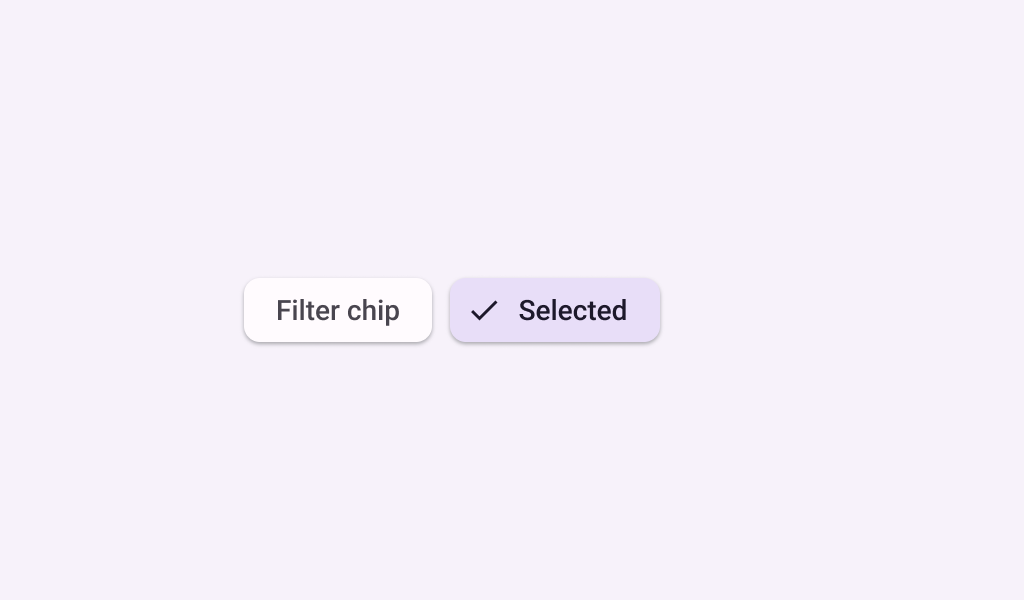
| leadingIcon | optional icon at the start of the chip, preceding the `label` text. When `selected` is true, this icon may visually indicate that the chip is selected (for example, via a checkmark icon). |
| trailingIcon | optional icon at the end of the chip |
| shape | defines the shape of this chip's container, border (when `border` is not null), and shadow (when using `elevation`) |
| colors | `SelectableChipColors` that will be used to resolve the colors used for this chip in different states. See `FilterChipDefaults.elevatedFilterChipColors`. |
| elevation | `SelectableChipElevation` used to resolve the elevation for this chip in different states. This controls the size of the shadow below the chip. Additionally, when the container color is `ColorScheme.surface`, this controls the amount of primary color applied as an overlay. See `FilterChipDefaults.filterChipElevation`. |
| border | the border to draw around the container of this chip. Pass `null` for no border. See `FilterChipDefaults.filterChipBorder`. |
| horizontalArrangement | the horizontal arrangement of the chip's children. If there aren't icons, then the horizontal padding between the `label` and the `border` will be the sum of `contentPadding` and the spacing in this `horizontalArrangement`. |
| contentPadding | the padding around the content of this chip, including the `leadingIcon`, `label`, and `trailingIcon`. |
| interactionSource | an optional hoisted `MutableInteractionSource` for observing and emitting `Interaction`s for this chip. You can use this to change the chip's appearance or preview the chip in different states. Note that if `null` is provided, interactions will still happen internally. |
Common
> **Deprecated** Maintained for binary compatibility
```kotlin
@Composable
fun ElevatedFilterChip(
selected: Boolean,
onClick: () -> Unit,
label: @Composable () -> Unit,
modifier: Modifier = Modifier,
enabled: Boolean = true,
leadingIcon: @Composable (() -> Unit)? = null,
trailingIcon: @Composable (() -> Unit)? = null,
shape: Shape = FilterChipDefaults.shape,
colors: SelectableChipColors = FilterChipDefaults.elevatedFilterChipColors(),
elevation: SelectableChipElevation? = FilterChipDefaults.elevatedFilterChipElevation(),
border: BorderStroke? = null,
interactionSource: MutableInteractionSource? = null,
) =
ElevatedFilterChip(
selected = selected,
modifier = modifier,
onClick = onClick,
enabled = enabled,
label = label,
leadingIcon = leadingIcon,
trailingIcon = trailingIcon,
elevation = elevation,
colors = colors,
contentPadding = FilterChipDefaults.ContentPadding,
shape = shape,
border = border,
interactionSource = interactionSource,
)
```
#### Parameters
| | |
| --- | --- |
| selected | whether this chip is selected or not |
| onClick | called when this chip is clicked |
| label | text label for this chip |
| modifier | the `Modifier` to be applied to this chip |
| enabled | controls the enabled state of this chip. When `false`, this component will not respond to user input, and it will appear visually disabled and disabled to accessibility services. |
| leadingIcon | optional icon at the start of the chip, preceding the `label` text. When `selected` is true, this icon may visually indicate that the chip is selected (for example, via a checkmark icon). |
| trailingIcon | optional icon at the end of the chip |
| shape | defines the shape of this chip's container, border (when `border` is not null), and shadow (when using `elevation`) |
| colors | `SelectableChipColors` that will be used to resolve the colors used for this chip in different states. See `FilterChipDefaults.elevatedFilterChipColors`. |
| elevation | `SelectableChipElevation` used to resolve the elevation for this chip in different states. This controls the size of the shadow below the chip. Additionally, when the container color is `ColorScheme.surface`, this controls the amount of primary color applied as an overlay. See `FilterChipDefaults.filterChipElevation`. |
| border | the border to draw around the container of this chip. Pass `null` for no border. See `FilterChipDefaults.filterChipBorder`. |
| interactionSource | an optional hoisted `MutableInteractionSource` for observing and emitting `Interaction`s for this chip. You can use this to change the chip's appearance or preview the chip in different states. Note that if `null` is provided, interactions will still happen internally. |
## Code Examples
### ElevatedFilterChipSample
```kotlin
@Preview
@Composable
fun ElevatedFilterChipSample() {
var selected by remember { mutableStateOf(false) }
ElevatedFilterChip(
selected = selected,
onClick = { selected = !selected },
label = { Text("Filter chip") },
leadingIcon =
if (selected) {
{
Icon(
imageVector = Icons.Filled.Done,
contentDescription = "Localized Description",
modifier = Modifier.size(FilterChipDefaults.IconSize),
)
}
} else {
null
},
)
}
```