
public object SpatialArrangementUsed to specify the arrangement of the layout's children in layouts like androidx.xr.compose.subspace.SpatialRow or androidx.xr.compose.subspace.SpatialColumn in the main axis direction (horizontal and vertical, respectively).
androidx.xr.compose.subspace.SpatialRow supports horizontal arrangements similar to androidx.compose.foundation.layout.Row: 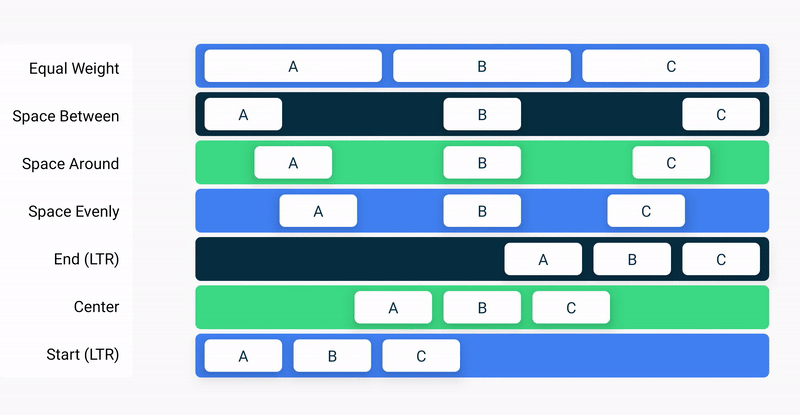
androidx.xr.compose.subspace.SpatialColumn supports horizontal arrangements similar to androidx.compose.foundation.layout.Column: 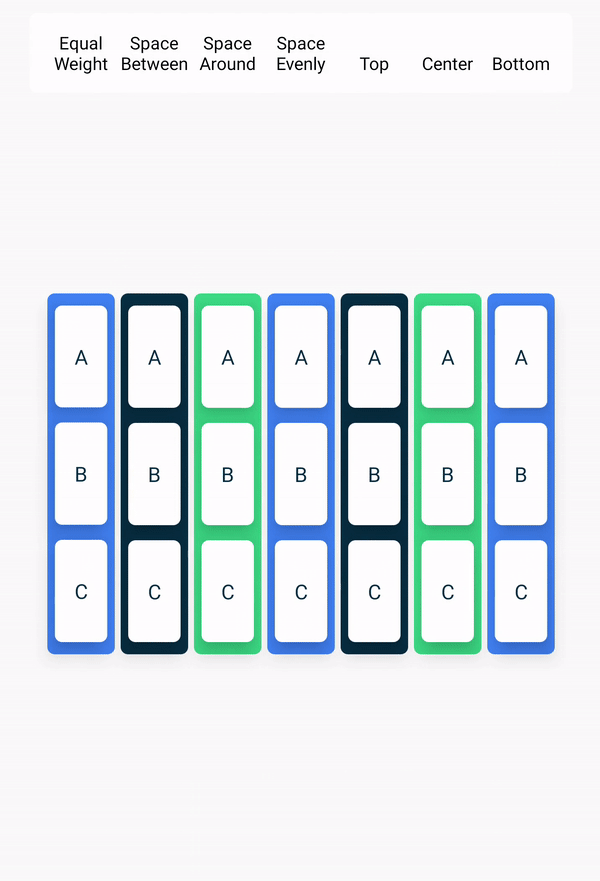
Properties
Start
public val Start: Horizontal =
        object : Horizontal {
            override fun Density.arrange(
                totalSize: Int,
                sizes: IntArray,
                layoutDirection: LayoutDirection,
                outPositions: IntArray,
            ) {
                if (layoutDirection == LayoutDirection.Ltr) {
                    placeLeftOrTop(size = sizes, outPosition = outPositions, reverseInput = false)
                } else {
                    placeRightOrBottom(
                        totalSize = totalSize,
                        size = sizes,
                        outPosition = outPositions,
                        reverseInput = true,
                    )
                }
            }

            override fun toString() = "SpatialArrangement#Start"
        }
All children should be arranged at the start of the row (left if the layout direction is LTR, right otherwise). Visually: 123#### for LTR and ####321 for RTL
End
public val End: Horizontal =
        object : Horizontal {
            override fun Density.arrange(
                totalSize: Int,
                sizes: IntArray,
                layoutDirection: LayoutDirection,
                outPositions: IntArray,
            ) {
                if (layoutDirection == LayoutDirection.Ltr) {
                    placeRightOrBottom(
                        totalSize = totalSize,
                        size = sizes,
                        outPosition = outPositions,
                        reverseInput = false,
                    )
                } else {
                    placeLeftOrTop(size = sizes, outPosition = outPositions, reverseInput = true)
                }
            }

            override fun toString() = "SpatialArrangement#End"
        }
All children should be arranged at the end of the row (right if the layout direction is LTR, right otherwise). Visually: ####123 for LTR and 321#### for RTL
Top
public val Top: Vertical =
        object : Vertical {
            override fun Density.arrange(totalSize: Int, sizes: IntArray, outPositions: IntArray) {
                placeLeftOrTop(size = sizes, outPosition = outPositions, reverseInput = false)
            }

            override fun toString() = "SpatialArrangement#Top"
        }
All children should be arranged at the top of the column. Visually: (top) 123#### (bottom)
Bottom
public val Bottom: Vertical =
        object : Vertical {
            override fun Density.arrange(totalSize: Int, sizes: IntArray, outPositions: IntArray) {
                placeRightOrBottom(
                    totalSize = totalSize,
                    size = sizes,
                    outPosition = outPositions,
                    reverseInput = false,
                )
            }

            override fun toString() = "SpatialArrangement#Bottom"
        }
All children should be arranged at the bottom of the column. Visually: (top) ####123 (bottom)
Center
public val Center: AxisIndependent =
        object : AxisIndependent {
            override val spacing: Dp
                get() = super.spacing

            override fun Density.arrange(totalSize: Int, sizes: IntArray, outPositions: IntArray) {
                placeCenter(
                    totalSize = totalSize,
                    size = sizes,
                    outPosition = outPositions,
                    reverseInput = false,
                )
            }

            override fun Density.arrange(
                totalSize: Int,
                sizes: IntArray,
                layoutDirection: LayoutDirection,
                outPositions: IntArray,
            ) {
                if (layoutDirection == LayoutDirection.Ltr) {
                    placeCenter(
                        totalSize = totalSize,
                        size = sizes,
                        outPosition = outPositions,
                        reverseInput = false,
                    )
                } else {
                    placeCenter(
                        totalSize = totalSize,
                        size = sizes,
                        outPosition = outPositions,
                        reverseInput = true,
                    )
                }
            }

            override fun toString() = "SpatialArrangement#Center"
        }
All children should be arranged at the center of the row or column. Visually: ##123## for LTR and ##321## for RTL
SpaceBetween
public val SpaceBetween: AxisIndependent =
        object : AxisIndependent {
            override val spacing: Dp
                get() = super.spacing

            override fun Density.arrange(totalSize: Int, sizes: IntArray, outPositions: IntArray) {
                placeSpaceBetween(
                    totalSize = totalSize,
                    size = sizes,
                    outPosition = outPositions,
                    reverseInput = false,
                )
            }

            override fun Density.arrange(
                totalSize: Int,
                sizes: IntArray,
                layoutDirection: LayoutDirection,
                outPositions: IntArray,
            ) {
                if (layoutDirection == LayoutDirection.Ltr) {
                    placeSpaceBetween(
                        totalSize = totalSize,
                        size = sizes,
                        outPosition = outPositions,
                        reverseInput = false,
                    )
                } else {
                    placeSpaceBetween(
                        totalSize = totalSize,
                        size = sizes,
                        outPosition = outPositions,
                        reverseInput = true,
                    )
                }
            }

            override fun toString() = "SpatialArrangement#SpaceBetween"
        }
There should be equal space between the children and no space before the first child or after the last child. Visually: 1##2##3 for LTR or 3##2##1 for RTL
SpaceAround
public val SpaceAround: AxisIndependent =
        object : AxisIndependent {
            override val spacing: Dp
                get() = super.spacing

            override fun Density.arrange(totalSize: Int, sizes: IntArray, outPositions: IntArray) {
                placeSpaceAround(
                    totalSize = totalSize,
                    size = sizes,
                    outPosition = outPositions,
                    reverseInput = false,
                )
            }

            override fun Density.arrange(
                totalSize: Int,
                sizes: IntArray,
                layoutDirection: LayoutDirection,
                outPositions: IntArray,
            ) {
                if (layoutDirection == LayoutDirection.Ltr) {
                    placeSpaceAround(
                        totalSize = totalSize,
                        size = sizes,
                        outPosition = outPositions,
                        reverseInput = false,
                    )
                } else {
                    placeSpaceAround(
                        totalSize = totalSize,
                        size = sizes,
                        outPosition = outPositions,
                        reverseInput = true,
                    )
                }
            }

            override fun toString() = "SpatialArrangement#SpaceAround"
        }
There should be equal space around each child. Visually: #1##2##3# for LTR and #3##2##1# for RTL
SpaceEvenly
public val SpaceEvenly: AxisIndependent =
        object : AxisIndependent {
            override val spacing: Dp
                get() = super.spacing

            override fun Density.arrange(totalSize: Int, sizes: IntArray, outPositions: IntArray) {
                placeSpaceEvenly(
                    totalSize = totalSize,
                    size = sizes,
                    outPosition = outPositions,
                    reverseInput = false,
                )
            }

            override fun Density.arrange(
                totalSize: Int,
                sizes: IntArray,
                layoutDirection: LayoutDirection,
                outPositions: IntArray,
            ) {
                if (layoutDirection == LayoutDirection.Ltr) {
                    placeSpaceEvenly(
                        totalSize = totalSize,
                        size = sizes,
                        outPosition = outPositions,
                        reverseInput = false,
                    )
                } else {
                    placeSpaceEvenly(
                        totalSize = totalSize,
                        size = sizes,
                        outPosition = outPositions,
                        reverseInput = true,
                    )
                }
            }

            override fun toString() = "SpatialArrangement#SpaceEvenly"
        }
There should be equal space between the children and before the first child and after the last child. Visually: #1#2#3# for LTR and #3#2#1# for RTL
Functions
spacedBy
public fun spacedBy(space: Dp): AxisIndependentChildren are placed next to each other with fixed space between them along the main axis.
Parameters
| space | fixed space Dp to place between adjacent children. |
spacedBy
public fun spacedBy(space: Dp, spatialAlignment: SpatialAlignment.Horizontal): HorizontalChildren are placed next to each other with fixed space between them horizontally and aligned them according to the spatialAlignment given.
Parameters
| space | fixed space Dp to place between adjacent children. |
| spatialAlignment | SpatialAlignment.Horizontal to align the children with. |
spacedBy
public fun spacedBy(space: Dp, spatialAlignment: SpatialAlignment.Vertical): VerticalChildren are placed next to each other with fixed space between them vertically and align them according to the spatialAlignment given.
Parameters
| space | fixed space Dp to place between adjacent children. |
| spatialAlignment | SpatialAlignment.Vertical to align the children with. |
aligned
public fun aligned(spatialAlignment: SpatialAlignment.Horizontal): HorizontalChildren placed next to each other horizontally and align them according to the spatialAlignment given.
Parameters
| spatialAlignment | SpatialAlignment.Horizontal to align the children with. |
aligned
public fun aligned(spatialAlignment: SpatialAlignment.Vertical): VerticalChildren placed next to each other vertically and align them according to the spatialAlignment.
Parameters
| spatialAlignment | SpatialAlignment.Vertical to align the children with. |
Members
Horizontal
public interface HorizontalUsed to specify the horizontal arrangement of the layout's children in layouts like androidx.xr.compose.subspace.SpatialRow.
Properties
spacing
public val spacing: DpSpacing that should be added between any two adjacent layout children.
Functions
arrange
public fun Density.arrange(
            totalSize: Int,
            sizes: IntArray,
            layoutDirection: LayoutDirection,
            outPositions: IntArray,
        )
Horizontally places the layout children.
Parameters
| totalSize | Available space that can be occupied by the children, in pixels. |
| sizes | An array of sizes of all children, in pixels. |
| layoutDirection | A layout direction, left-to-right or right-to-left, of the parent layout that should be taken into account when determining positions of the children. |
| outPositions | An array of the size of sizes that returns the calculated positions. Position of each child is from the left edge of the parent to center of the child, in pixels. |
Vertical
public interface VerticalUsed to specify the vertical arrangement of the layout's children in layouts like androidx.xr.compose.subspace.SpatialColumn.
Properties
spacing
public val spacing: DpSpacing that should be added between any two adjacent layout children.
Functions
arrange
public fun Density.arrange(totalSize: Int, sizes: IntArray, outPositions: IntArray)Vertically places the layout children.
Parameters
| totalSize | Available space that can be occupied by the children, in pixels. |
| sizes | An array of sizes of all children, in pixels. |
| outPositions | An array of the size of sizes that returns the calculated positions. Position of each child is from the top edge of the parent to center of the child, in pixels. |
AxisIndependent
public interface AxisIndependent : Horizontal, VerticalUsed to specify the horizontal arrangement of the layout's children in horizontal layouts like androidx.xr.compose.subspace.SpatialRow, or the vertical arrangement of the layout's children in vertical layouts like androidx.xr.compose.subspace.SpatialColumn.
Properties
spacing
override val spacing: DpSpacing that should be added between any two adjacent layout children.
Absolute
public object AbsoluteUsed to specify arrangement which doesn't change with layout direction.
Properties
Left
public val Left: Horizontal =
            object : Horizontal {
                override fun Density.arrange(
                    totalSize: Int,
                    sizes: IntArray,
                    layoutDirection: LayoutDirection,
                    outPositions: IntArray,
                ) {
                    placeLeftOrTop(size = sizes, outPosition = outPositions, reverseInput = false)
                }

                override fun toString() = "SpatialAbsoluteArrangement#Left"
            }
All children should be arranged at the left of the androidx.xr.compose.subspace.SpatialRow. Unlike SpatialArrangement.Start, when layout direction is RTL, children will not be mirrored. Visually: 123####
Center
public val Center: Horizontal =
            object : Horizontal {
                override fun Density.arrange(
                    totalSize: Int,
                    sizes: IntArray,
                    layoutDirection: LayoutDirection,
                    outPositions: IntArray,
                ) {
                    placeCenter(
                        totalSize = totalSize,
                        size = sizes,
                        outPosition = outPositions,
                        reverseInput = false,
                    )
                }

                override fun toString() = "SpatialAbsoluteArrangement#Center"
            }
All children should be arranged at the center of the androidx.xr.compose.subspace.SpatialRow. Unlike SpatialArrangement.Center, when layout direction is RTL, children will not be mirrored. Visually: ##123##
Right
public val Right: Horizontal =
            object : Horizontal {
                override fun Density.arrange(
                    totalSize: Int,
                    sizes: IntArray,
                    layoutDirection: LayoutDirection,
                    outPositions: IntArray,
                ) {
                    placeRightOrBottom(
                        totalSize = totalSize,
                        size = sizes,
                        outPosition = outPositions,
                        reverseInput = false,
                    )
                }

                override fun toString() = "SpatialAbsoluteArrangement#Right"
            }
All children should be arranged at the right of the androidx.xr.compose.subspace.SpatialRow. Unlike SpatialArrangement.End, when layout direction is RTL, children will not be mirrored. Visually: ####123
SpaceEvenly
public val SpaceEvenly: Horizontal =
            object : Horizontal {
                override fun Density.arrange(
                    totalSize: Int,
                    sizes: IntArray,
                    layoutDirection: LayoutDirection,
                    outPositions: IntArray,
                ) {
                    placeSpaceEvenly(
                        totalSize = totalSize,
                        size = sizes,
                        outPosition = outPositions,
                        reverseInput = false,
                    )
                }

                override fun toString() = "SpatialAbsoluteArrangement#SpaceEvenly"
            }
There should be equal space between the children and before the first child and after the last child. Unlike SpatialArrangement.SpaceEvenly, when layout direction is RTL, children will not be mirrored. Visually: #1#2#3#
SpaceBetween
public val SpaceBetween: Horizontal =
            object : Horizontal {
                override fun Density.arrange(
                    totalSize: Int,
                    sizes: IntArray,
                    layoutDirection: LayoutDirection,
                    outPositions: IntArray,
                ) {
                    placeSpaceBetween(
                        totalSize = totalSize,
                        size = sizes,
                        outPosition = outPositions,
                        reverseInput = false,
                    )
                }

                override fun toString() = "SpatialAbsoluteArrangement#SpaceBetween"
            }
There should be equal space between the children and no space before the first child or after the last child. Unlike SpatialArrangement.SpaceBetween, when layout direction is RTL, children will not be mirrored. Visually: 1##2##3
SpaceAround
public val SpaceAround: Horizontal =
            object : Horizontal {
                override fun Density.arrange(
                    totalSize: Int,
                    sizes: IntArray,
                    layoutDirection: LayoutDirection,
                    outPositions: IntArray,
                ) {
                    placeSpaceAround(
                        totalSize = totalSize,
                        size = sizes,
                        outPosition = outPositions,
                        reverseInput = false,
                    )
                }

                override fun toString() = "SpatialAbsoluteArrangement#SpaceAround"
            }
There should be equal space around each child. Unlike SpatialArrangement.SpaceAround, when layout direction is RTL, children will not be mirrored. Visually: #1##2##3##4#
Functions
spacedBy
public fun spacedBy(space: Dp, spatialAlignment: SpatialAlignment.Horizontal): HorizontalChildren are placed next to each other with fixed space between them horizontally and align them according to the spatialAlignment given. Unlike SpatialArrangement.spacedBy, when layout direction is RTL, children will not be mirrored.
Parameters
| space | fixed space Dp to place between adjacent children. |
| spatialAlignment | SpatialAlignment.Horizontal to align the children with. |
aligned
public fun aligned(spatialAlignment: SpatialAlignment.Horizontal): HorizontalChildren placed next to each other horizontally and align them according to the spatialAlignment given. Unlike SpatialArrangement.spacedBy, when layout direction is RTL, children will not be mirrored.
Parameters
| spatialAlignment | SpatialAlignment.Horizontal to align the children with. |
