
Source set: Common
public class Colors(
    primary: Color,
    primaryVariant: Color,
    secondary: Color,
    secondaryVariant: Color,
    background: Color,
    surface: Color,
    error: Color,
    onPrimary: Color,
    onSecondary: Color,
    onBackground: Color,
    onSurface: Color,
    onError: Color,
    isLight: Boolean,
)The Material Design color system can help you create a color theme that reflects your brand or style.
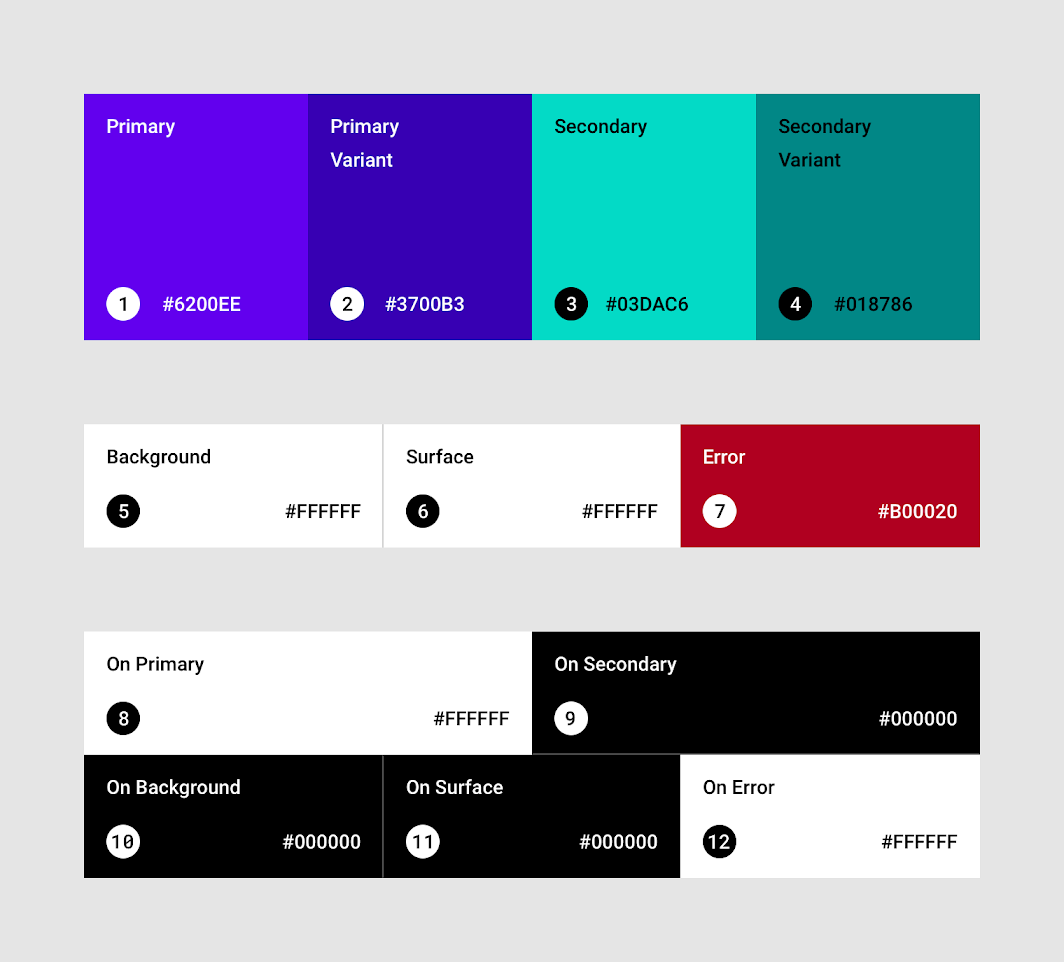
To create a light set of colors using the baseline values, use lightColors To create a dark set of colors using the baseline values, use darkColors
Properties
primary
Source set: Common
public var primary: Color by mutableStateOf(primary, structuralEqualityPolicy())primaryVariant
Source set: Common
public var primaryVariant: Color by mutableStateOf(primaryVariant, structuralEqualityPolicy())secondary
Source set: Common
public var secondary: Color by mutableStateOf(secondary, structuralEqualityPolicy())secondaryVariant
Source set: Common
public var secondaryVariant: Color by
        mutableStateOf(secondaryVariant, structuralEqualityPolicy())
background
Source set: Common
public var background: Color by mutableStateOf(background, structuralEqualityPolicy())surface
Source set: Common
public var surface: Color by mutableStateOf(surface, structuralEqualityPolicy())error
Source set: Common
public var error: Color by mutableStateOf(error, structuralEqualityPolicy())onPrimary
Source set: Common
public var onPrimary: Color by mutableStateOf(onPrimary, structuralEqualityPolicy())onSecondary
Source set: Common
public var onSecondary: Color by mutableStateOf(onSecondary, structuralEqualityPolicy())onBackground
Source set: Common
public var onBackground: Color by mutableStateOf(onBackground, structuralEqualityPolicy())onSurface
Source set: Common
public var onSurface: Color by mutableStateOf(onSurface, structuralEqualityPolicy())onError
Source set: Common
public var onError: Color by mutableStateOf(onError, structuralEqualityPolicy())isLight
Source set: Common
public var isLight: Boolean by mutableStateOf(isLight, structuralEqualityPolicy())Functions
copy
Source set: Common
public fun copy(
        primary: Color = this.primary,
        primaryVariant: Color = this.primaryVariant,
        secondary: Color = this.secondary,
        secondaryVariant: Color = this.secondaryVariant,
        background: Color = this.background,
        surface: Color = this.surface,
        error: Color = this.error,
        onPrimary: Color = this.onPrimary,
        onSecondary: Color = this.onSecondary,
        onBackground: Color = this.onBackground,
        onSurface: Color = this.onSurface,
        onError: Color = this.onError,
        isLight: Boolean = this.isLight,
    ): Colors
Returns a copy of this Colors, optionally overriding some of the values.
toString
Source set: Common
override fun toString(): String