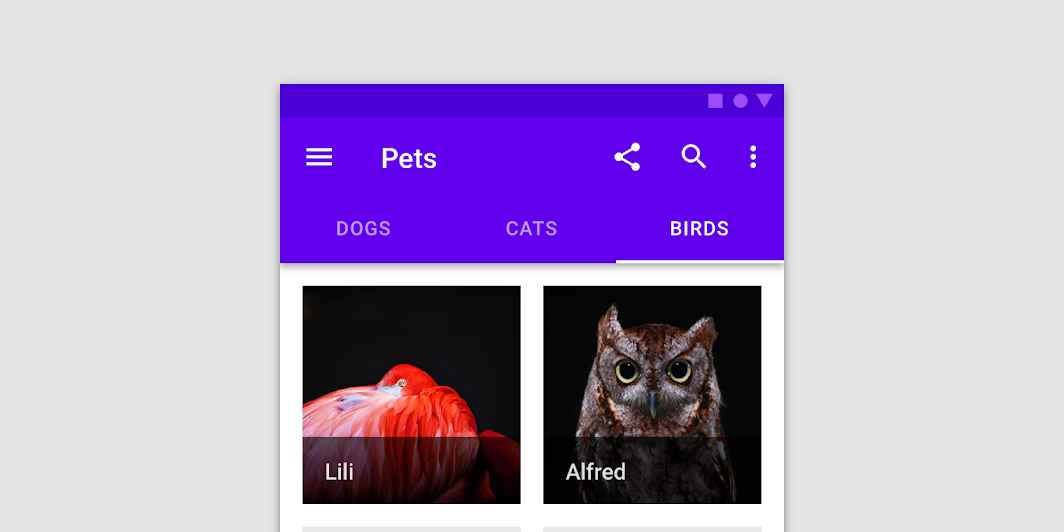
Material Design fixed tabs Fixed tabs display all tabs in a set simultaneously.
TextTabs
@Sampled
@Composable
fun TextTabs() {
    var state by remember { mutableStateOf(0) }
    val titles = listOf("TAB 1", "TAB 2", "TAB 3 WITH LOTS OF TEXT")
    Column {
        TabRow(selectedTabIndex = state) {
            titles.forEachIndexed { index, title ->
                Tab(text = { Text(title) }, selected = state == index, onClick = { state = index })
            }
        }
        Text(
            modifier = Modifier.align(Alignment.CenterHorizontally),
            text = "Text tab ${state + 1} selected",
            style = MaterialTheme.typography.body1,
        )
    }
}
FancyTabs
@Sampled
@Composable
fun FancyTabs() {
    var state by remember { mutableStateOf(0) }
    val titles = listOf("TAB 1", "TAB 2", "TAB 3")
    Column {
        TabRow(selectedTabIndex = state) {
            titles.forEachIndexed { index, title ->
                FancyTab(title = title, onClick = { state = index }, selected = (index == state))
            }
        }
        Text(
            modifier = Modifier.align(Alignment.CenterHorizontally),
            text = "Fancy tab ${state + 1} selected",
            style = MaterialTheme.typography.body1,
        )
    }
}
FancyTab
@Sampled
@Composable
fun FancyTab(title: String, onClick: () -> Unit, selected: Boolean) {
    Tab(selected, onClick) {
        Column(
            Modifier.padding(10.dp).height(50.dp).fillMaxWidth(),
            verticalArrangement = Arrangement.SpaceBetween,
        ) {
            Box(
                Modifier.size(10.dp)
                    .align(Alignment.CenterHorizontally)
                    .background(color = if (selected) Color.Red else Color.White)
            )
            Text(
                text = title,
                style = MaterialTheme.typography.body1,
                modifier = Modifier.align(Alignment.CenterHorizontally),
            )
        }
    }
}
FancyIndicator
@Sampled
@Composable
fun FancyIndicator(color: Color, modifier: Modifier = Modifier) {
    // Draws a rounded rectangular with border around the Tab, with a 5.dp padding from the edges
    // Color is passed in as a parameter [color]
    Box(
        modifier
            .padding(5.dp)
            .fillMaxSize()
            .border(BorderStroke(2.dp, color), RoundedCornerShape(5.dp))
    )
}
FancyIndicatorTabs
@Sampled
@Composable
fun FancyIndicatorTabs() {
    var state by remember { mutableStateOf(0) }
    val titles = listOf("TAB 1", "TAB 2", "TAB 3")

    // Reuse the default offset animation modifier, but use our own indicator
    val indicator =
FancyAnimatedIndicator
@Sampled
@Composable
fun FancyAnimatedIndicator(tabPositions: List<TabPosition>, selectedTabIndex: Int) {
    val colors = listOf(Color.Yellow, Color.Red, Color.Green)
    val transition = updateTransition(selectedTabIndex)
    val indicatorStart by
        transition.animateDp(
            transitionSpec = {
                // Handle directionality here, if we are moving to the right, we
                // want the right side of the indicator to move faster, if we are
                // moving to the left, we want the left side to move faster.
                if (initialState < targetState) {
                    spring(dampingRatio = 1f, stiffness = 50f)
                } else {
                    spring(dampingRatio = 1f, stiffness = 1000f)
                }
            }
        ) {
            tabPositions[it].left
        }

    val indicatorEnd by
        transition.animateDp(
            transitionSpec = {
                // Handle directionality here, if we are moving to the right, we
                // want the right side of the indicator to move faster, if we are
                // moving to the left, we want the left side to move faster.
                if (initialState < targetState) {
                    spring(dampingRatio = 1f, stiffness = 1000f)
                } else {
                    spring(dampingRatio = 1f, stiffness = 50f)
                }
            }
        ) {
            tabPositions[it].right
        }

    val indicatorColor by transition.animateColor { colors[it % colors.size] }

    FancyIndicator(
        // Pass the current color to the indicator
        indicatorColor,
        modifier =
            Modifier
                // Fill up the entire TabRow, and place the indicator at the start
                .fillMaxSize()
                .wrapContentSize(align = Alignment.BottomStart)
                // Apply an offset from the start to correctly position the indicator around the tab
                .offset { IntOffset(indicatorStart.roundToPx(), 0) }
                // Make the width of the indicator follow the animated width as we move between tabs
                .width(indicatorEnd - indicatorStart),
    )
}
FancyIndicatorContainerTabs
@Sampled
@Composable
fun FancyIndicatorContainerTabs() {
    var state by remember { mutableStateOf(0) }
    val titles = listOf("TAB 1", "TAB 2", "TAB 3")

    val indicator =