
Vela
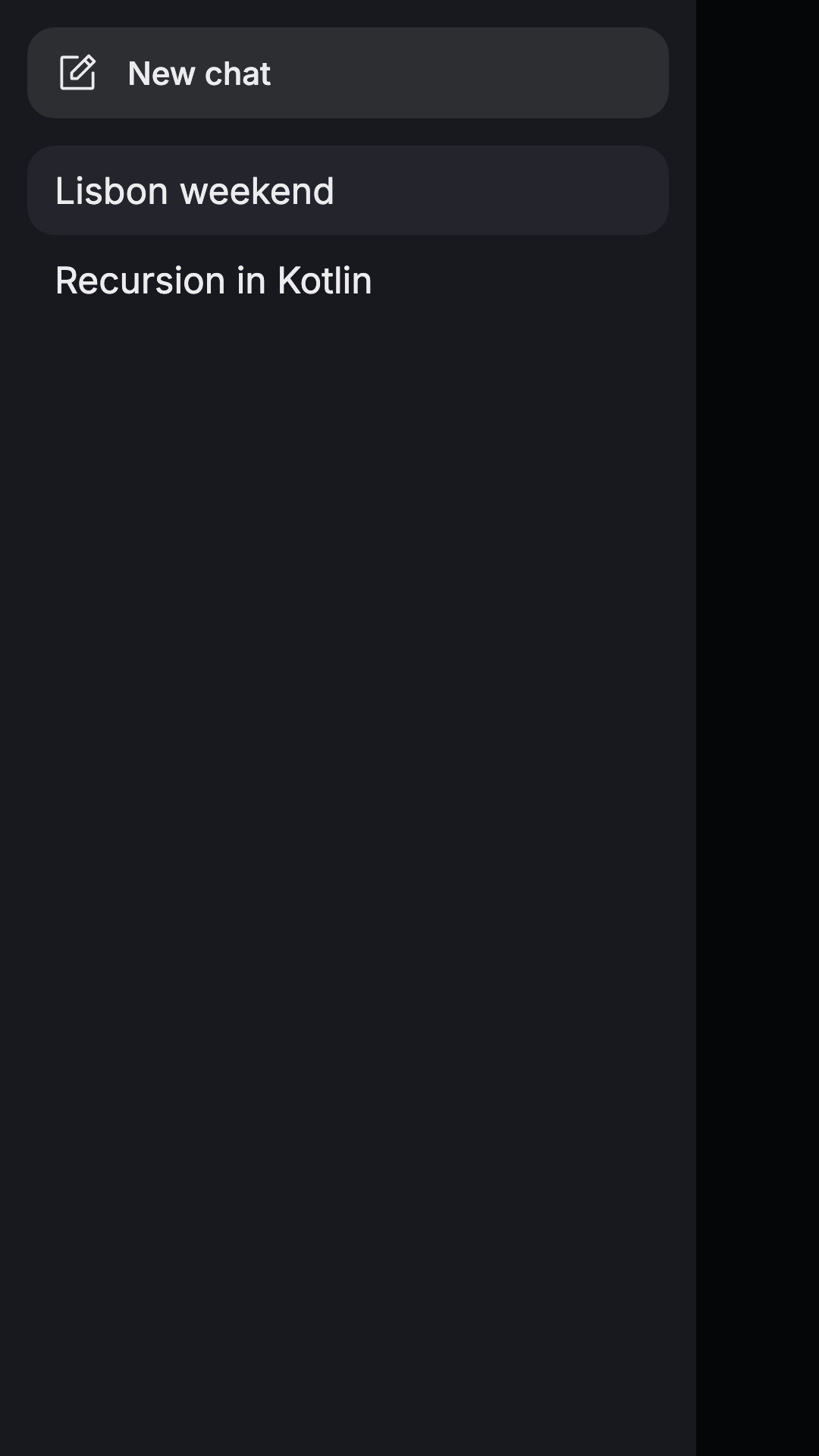
Drawer Item
package com.composables.vela.components

import androidx.compose.foundation.background
import androidx.compose.foundation.combinedClickable
import androidx.compose.foundation.interaction.MutableInteractionSource
import androidx.compose.foundation.layout.Arrangement
import androidx.compose.foundation.layout.Box
import androidx.compose.foundation.layout.Row
import androidx.compose.foundation.layout.fillMaxWidth
import androidx.compose.foundation.layout.padding
import androidx.compose.foundation.layout.size
import androidx.compose.runtime.Composable
import androidx.compose.runtime.remember
import androidx.compose.ui.Alignment
import androidx.compose.ui.Modifier
import androidx.compose.ui.draw.clip
import androidx.compose.ui.graphics.Color
import androidx.compose.ui.graphics.vector.ImageVector
import androidx.compose.ui.semantics.Role
import androidx.compose.ui.semantics.selected
import androidx.compose.ui.semantics.semantics
import androidx.compose.ui.text.style.TextOverflow
import androidx.compose.ui.unit.dp
import com.composables.compose.ripple.rememberRippleIndication
import com.composables.vela.theme.Space
import com.composables.vela.theme.Theme

@Composable
fun DrawerItem(
    label: String,
    onClick: () -> Unit,
    modifier: Modifier = Modifier,
    icon: ImageVector? = null,
    selected: Boolean = false,
    onLongClick: (() -> Unit)? = null,
) {
    // Foundation's combinedClickable adds the long press that UnstyledButton doesn't offer.
    Box(
        modifier
            .fillMaxWidth()
            .clip(Theme.shapes.small)
            .background(if (selected) Theme.colors.surfaceVariant else Color.Transparent)
            .combinedClickable(
                interactionSource = remember { MutableInteractionSource() },
                indication = rememberRippleIndication(color = Theme.colors.onSurface),
                role = Role.Button,
                onLongClickLabel = if (onLongClick != null) "Chat options" else null,
                onLongClick = onLongClick,
                onClick = onClick,
            )
            .semantics { this.selected = selected }
            .padding(horizontal = Space * 3, vertical = Space * 2.5f),
        contentAlignment = Alignment.CenterStart,
    ) {
        Row(
            verticalAlignment = Alignment.CenterVertically,
            horizontalArrangement = Arrangement.spacedBy(Space * 3),
        ) {
            if (icon != null) Icon(icon, contentDescription = null, modifier = Modifier.size(20.dp))
            Text(
                label,
                style = if (icon != null) Theme.typography.label else Theme.typography.body,
                maxLines = 1,
                overflow = TextOverflow.Ellipsis,
            )
        }
    }
}
package com.composables.vela.components

import androidx.compose.foundation.background
import androidx.compose.foundation.interaction.MutableInteractionSource
import androidx.compose.foundation.layout.PaddingValues
import androidx.compose.runtime.Composable
import androidx.compose.runtime.remember
import androidx.compose.ui.Modifier
import androidx.compose.ui.draw.alpha
import androidx.compose.ui.draw.clip
import androidx.compose.ui.graphics.Color
import com.composables.compose.ripple.rememberRippleIndication
import com.composables.vela.theme.ProvideContentColor
import com.composables.vela.theme.ProvideTextStyle
import com.composables.vela.theme.Space
import com.composables.vela.theme.Theme
import com.composeunstyled.UnstyledButton

enum class ButtonVariant {
    Primary,
    Secondary,
    Destructive,
    Ghost,
}

@Composable
fun Button(
    onClick: () -> Unit,
    modifier: Modifier = Modifier,
    enabled: Boolean = true,
    variant: ButtonVariant = ButtonVariant.Primary,
    content: @Composable () -> Unit,
) {
    val (container, contentColor) =
        when (variant) {
            ButtonVariant.Secondary -> Theme.colors.surfaceVariant to Theme.colors.onSurfaceVariant
            ButtonVariant.Destructive -> Theme.colors.destructive to Theme.colors.onDestructive
            ButtonVariant.Ghost -> Color.Transparent to Theme.colors.primary
            else -> Theme.colors.primary to Theme.colors.onPrimary
        }
    UnstyledButton(
        onClick = onClick,
        enabled = enabled,
        modifier =
            modifier
                .alpha(if (enabled) 1f else 0.4f)
                .clip(Theme.shapes.fullyRounded)
                .background(container),
        contentPadding = PaddingValues(horizontal = Space * 5, vertical = Space * 3),
        indication = rememberRippleIndication(color = contentColor),
        interactionSource = remember { MutableInteractionSource() },
    ) {
        ProvideContentColor(contentColor) { ProvideTextStyle(Theme.typography.label, content) }
    }
}
package com.composables.vela.components

import androidx.compose.runtime.Composable
import androidx.compose.ui.Modifier
import androidx.compose.ui.graphics.Color
import androidx.compose.ui.graphics.isSpecified
import androidx.compose.ui.graphics.vector.ImageVector
import com.composables.vela.theme.LocalContentColor
import com.composeunstyled.UnstyledIcon

@Composable
fun Icon(
    imageVector: ImageVector,
    contentDescription: String?,
    modifier: Modifier = Modifier,
    tint: Color = LocalContentColor.current,
) {
    val resolvedTint = if (tint.isSpecified) tint else LocalContentColor.current
    UnstyledIcon(
        imageVector = imageVector,
        contentDescription = contentDescription,
        modifier = modifier,
        tint = resolvedTint,
    )
}
package com.composables.vela.components

import androidx.compose.foundation.text.BasicText
import androidx.compose.runtime.Composable
import androidx.compose.ui.Modifier
import androidx.compose.ui.graphics.Color
import androidx.compose.ui.graphics.isSpecified
import androidx.compose.ui.text.TextStyle
import androidx.compose.ui.text.style.TextOverflow
import com.composables.vela.theme.LocalContentColor
import com.composables.vela.theme.LocalTextStyle

@Composable
fun Text(
    text: String,
    modifier: Modifier = Modifier,
    color: Color = Color.Unspecified,
    style: TextStyle = LocalTextStyle.current,
    overflow: TextOverflow = TextOverflow.Clip,
    softWrap: Boolean = true,
    maxLines: Int = Int.MAX_VALUE,
) {
    val resolvedColor =
        when {
            color.isSpecified -> color
            style.color.isSpecified -> style.color
            else -> LocalContentColor.current
        }
    BasicText(
        text = text,
        modifier = modifier,
        style = LocalTextStyle.current.merge(style).copy(color = resolvedColor),
        overflow = overflow,
        softWrap = softWrap,
        maxLines = maxLines,
    )
}
package com.composables.vela.theme

import androidx.compose.foundation.isSystemInDarkTheme
import androidx.compose.foundation.shape.RoundedCornerShape
import androidx.compose.foundation.text.selection.LocalTextSelectionColors
import androidx.compose.foundation.text.selection.TextSelectionColors
import androidx.compose.runtime.*
import androidx.compose.runtime.Composable
import androidx.compose.runtime.CompositionLocalProvider
import androidx.compose.runtime.compositionLocalOf
import androidx.compose.runtime.staticCompositionLocalOf
import androidx.compose.ui.graphics.*
import androidx.compose.ui.graphics.Color
import androidx.compose.ui.text.*
import androidx.compose.ui.text.TextStyle
import androidx.compose.ui.text.font.*
import androidx.compose.ui.unit.*
import androidx.compose.ui.unit.Dp
import androidx.compose.ui.unit.dp
import com.composables.googlefonts.rememberGoogleFontFamily

@Immutable
data class ThemeColors(
    val `background`: Color = Color(0xFF0E0F12),
    val `onBackground`: Color = Color(0xFFECECEF),
    val `surface`: Color = Color(0xFF18191E),
    val `onSurface`: Color = Color(0xFFECECEF),
    val `surfaceVariant`: Color = Color(0xFF24252C),
    val `onSurfaceVariant`: Color = Color(0xFFECECEF),
    val `onBackgroundMuted`: Color = Color(0xFF8D8F99),
    val `primary`: Color = Color(0xFFD6F36B),
    val `onPrimary`: Color = Color(0xFF0E0F12),
    val `border`: Color = Color(0xFF2B2C34),
    val `textSelection`: Color = Color(0x66D6F36B),
    val `destructive`: Color = Color(0xFFFF7B72),
    val `onDestructive`: Color = Color(0xFF0E0F12),
)

@Immutable
data class ThemeTypography(
    val `display`: TextStyle =
        TextStyle(
            fontFamily = FontFamily.SansSerif,
            fontSize = 30.sp,
            lineHeight = 36.sp,
            fontWeight = FontWeight(500),
        ),
    val `title`: TextStyle =
        TextStyle(
            fontFamily = FontFamily.SansSerif,
            fontSize = 18.sp,
            lineHeight = 24.sp,
            fontWeight = FontWeight(500),
        ),
    val `body`: TextStyle =
        TextStyle(
            fontFamily = FontFamily.SansSerif,
            fontSize = 16.sp,
            lineHeight = 26.sp,
            fontWeight = FontWeight(400),
        ),
    val `label`: TextStyle =
        TextStyle(
            fontFamily = FontFamily.SansSerif,
            fontSize = 14.sp,
            lineHeight = 20.sp,
            fontWeight = FontWeight(500),
        ),
    val `caption`: TextStyle =
        TextStyle(
            fontFamily = FontFamily.SansSerif,
            fontSize = 12.sp,
            lineHeight = 16.sp,
            fontWeight = FontWeight(400),
        ),
    val `code`: TextStyle =
        TextStyle(
            fontFamily = FontFamily.SansSerif,
            fontSize = 13.sp,
            lineHeight = 20.sp,
            fontWeight = FontWeight(400),
        ),
)

@Immutable
data class ThemeShapes(
    val `small`: Shape = RoundedCornerShape(12.dp),
    val `medium`: Shape = RoundedCornerShape(20.dp),
    val `large`: Shape = RoundedCornerShape(28.dp),
    val `fullyRounded`: Shape = RoundedCornerShape(50),
)

fun themeColors(dark: Boolean = false): ThemeColors = ThemeColors()

@Composable
fun resolveThemeTypography(typography: ThemeTypography = ThemeTypography()): ThemeTypography {
    val font0 = rememberGoogleFontFamily("Space Grotesk", weights = intArrayOf(500))
    val font1 = rememberGoogleFontFamily("Inter", weights = intArrayOf(400, 500))
    val font2 = rememberGoogleFontFamily("JetBrains Mono", weights = intArrayOf(400))
    return typography.copy(
        `display` = typography.`display`.copy(fontFamily = font0),
        `title` = typography.`title`.copy(fontFamily = font0),
        `body` = typography.`body`.copy(fontFamily = font1),
        `label` = typography.`label`.copy(fontFamily = font1),
        `caption` = typography.`caption`.copy(fontFamily = font1),
        `code` = typography.`code`.copy(fontFamily = font2),
    )
}

private val LocalColors = staticCompositionLocalOf<ThemeColors> { error("Theme is missing") }
private val LocalTypography =
    staticCompositionLocalOf<ThemeTypography> { error("Theme is missing") }
private val LocalSpace = staticCompositionLocalOf { 4.dp }
private val LocalShapes = staticCompositionLocalOf<ThemeShapes> { error("Theme is missing") }

val LocalContentColor = compositionLocalOf<Color> { error("Theme is missing") }
val LocalTextStyle = compositionLocalOf<TextStyle> { error("Theme is missing") }

object Theme {
    val colors: ThemeColors
        @Composable get() = LocalColors.current

    val typography: ThemeTypography
        @Composable get() = LocalTypography.current

    val shapes: ThemeShapes
        @Composable get() = LocalShapes.current
}

val Space: Dp
    @Composable get() = LocalSpace.current

@Composable
fun VelaTheme(
    colors: ThemeColors = themeColors(isSystemInDarkTheme()),
    typography: ThemeTypography = resolveThemeTypography(),
    space: Dp = 4.dp,
    shapes: ThemeShapes = ThemeShapes(),
    contentColor: Color = colors.onBackground,
    textStyle: TextStyle = typography.body,
    content: @Composable () -> Unit,
) {
    CompositionLocalProvider(
        LocalColors provides colors,
        LocalTypography provides typography,
        LocalSpace provides space,
        LocalShapes provides shapes,
        LocalContentColor provides contentColor,
        LocalTextStyle provides textStyle,
        LocalTextSelectionColors provides
            TextSelectionColors(
                handleColor = colors.primary,
                backgroundColor = colors.textSelection,
            ),
        content = content,
    )
}

@Composable
fun ProvideContentColor(color: Color, content: @Composable () -> Unit) {
    CompositionLocalProvider(LocalContentColor provides color, content = content)
}

@Composable
fun ProvideTextStyle(style: TextStyle, content: @Composable () -> Unit) {
    CompositionLocalProvider(
        LocalTextStyle provides LocalTextStyle.current.merge(style),
        content = content,
    )
}
More components from Vela