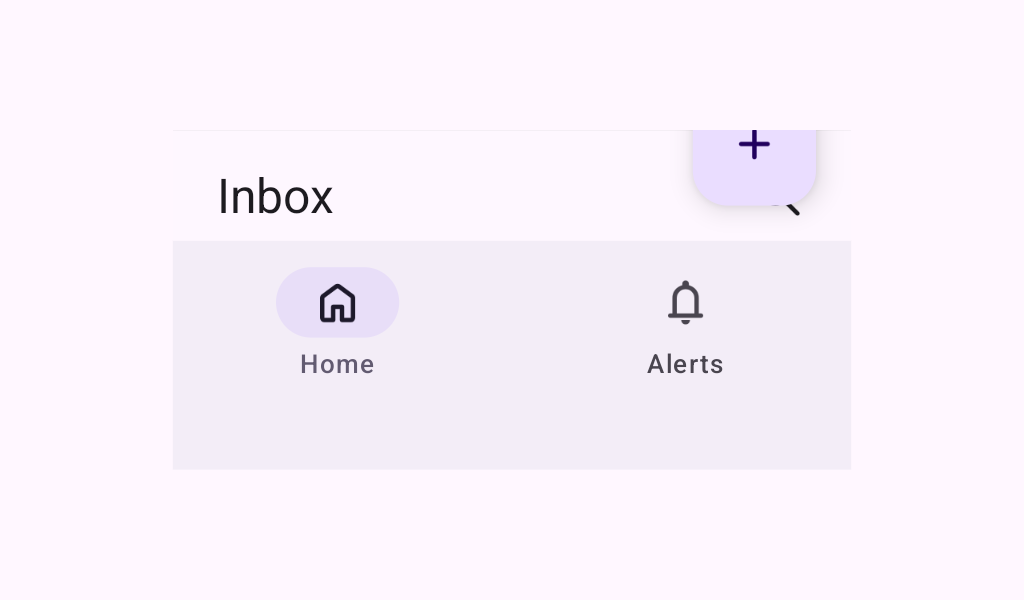

Scaffold implements the basic Material Design visual layout structure.

Common
@Composable
fun Scaffold(
    modifier: Modifier = Modifier,
    topBar: @Composable () -> Unit = {},
    bottomBar: @Composable () -> Unit = {},
    snackbarHost: @Composable () -> Unit = {},
    floatingActionButton: @Composable () -> Unit = {},
    floatingActionButtonPosition: FabPosition = FabPosition.End,
    containerColor: Color = MaterialTheme.colorScheme.background,
    contentColor: Color = contentColorFor(containerColor),
    contentWindowInsets: WindowInsets = ScaffoldDefaults.contentWindowInsets,
    content: @Composable (PaddingValues) -> Unit,
)

Parameters

modifier the Modifier to be applied to this scaffold
topBar top app bar of the screen, typically a TopAppBar
bottomBar bottom bar of the screen, typically a NavigationBar
snackbarHost component to host Snackbars that are pushed to be shown via SnackbarHostState.showSnackbar, typically a SnackbarHost
floatingActionButton Main action button of the screen, typically a FloatingActionButton
floatingActionButtonPosition position of the FAB on the screen. See FabPosition.
containerColor the color used for the background of this scaffold. Use Color.Transparent to have no color.
contentColor the preferred color for content inside this scaffold. Defaults to either the matching content color for containerColor, or to the current LocalContentColor if containerColor is not a color from the theme.
contentWindowInsets window insets to be passed to content slot via PaddingValues params. Scaffold will take the insets into account from the top/bottom only if the topBar/ bottomBar are not present, as the scaffold expect topBar/bottomBar to handle insets instead. Any insets consumed by other insets padding modifiers or consumeWindowInsets on a parent layout will be excluded from contentWindowInsets.
content content of the screen. The lambda receives a PaddingValues that should be applied to the content root via androidx.compose.foundation.layout.padding and androidx.compose.foundation.layout.consumeWindowInsets to properly offset top and bottom bars. If using androidx.compose.foundation.verticalScroll, apply this modifier to the child of the scroll, and not on the scroll itself.

Code Examples

ScaffoldWithSimpleSnackbar

@Preview
@Composable
fun ScaffoldWithSimpleSnackbar() {
    val snackbarHostState = remember { SnackbarHostState() }
    val scope = rememberCoroutineScope()
    Scaffold(
        snackbarHost = { SnackbarHost(snackbarHostState) },
        floatingActionButton = {
            var clickCount by remember { mutableStateOf(0) }
            ExtendedFloatingActionButton(
                onClick = {
                    // show snackbar as a suspend function
                    scope.launch { snackbarHostState.showSnackbar("Snackbar # ${++clickCount}") }
                }
            ) {
                Text("Show snackbar")
            }
        },
        content = { innerPadding ->
            Text(
                text = "Body content",
                modifier = Modifier.padding(innerPadding).fillMaxSize().wrapContentSize(),
            )
        },
    )
}

SimpleScaffoldWithTopBar

@OptIn(ExperimentalMaterial3Api::class)
@Preview
@Composable
fun SimpleScaffoldWithTopBar() {
    val colors =
        listOf(
            Color(0xFFffd7d7.toInt()),
            Color(0xFFffe9d6.toInt()),
            Color(0xFFfffbd0.toInt()),
            Color(0xFFe3ffd9.toInt()),
            Color(0xFFd0fff8.toInt()),
        )
    Scaffold(
        topBar = {
            TopAppBar(
                title = { Text("Simple Scaffold Screen") },
                navigationIcon = {
                    IconButton(onClick = { /* "Open nav drawer" */ }) {
                        Icon(Icons.Filled.Menu, contentDescription = "Localized description")
                    }
                },
            )
        },
        floatingActionButtonPosition = FabPosition.End,
        floatingActionButton = {
            ExtendedFloatingActionButton(onClick = { /* fab click handler */ }) { Text("Inc") }
        },
        content = { innerPadding ->
            LazyColumn(
                // consume insets as scaffold doesn't do it by default
                modifier = Modifier.consumeWindowInsets(innerPadding),
                contentPadding = innerPadding,
            ) {
                items(count = 100) {
                    Box(Modifier.fillMaxWidth().height(50.dp).background(colors[it % colors.size]))
                }
            }
        },
    )
}