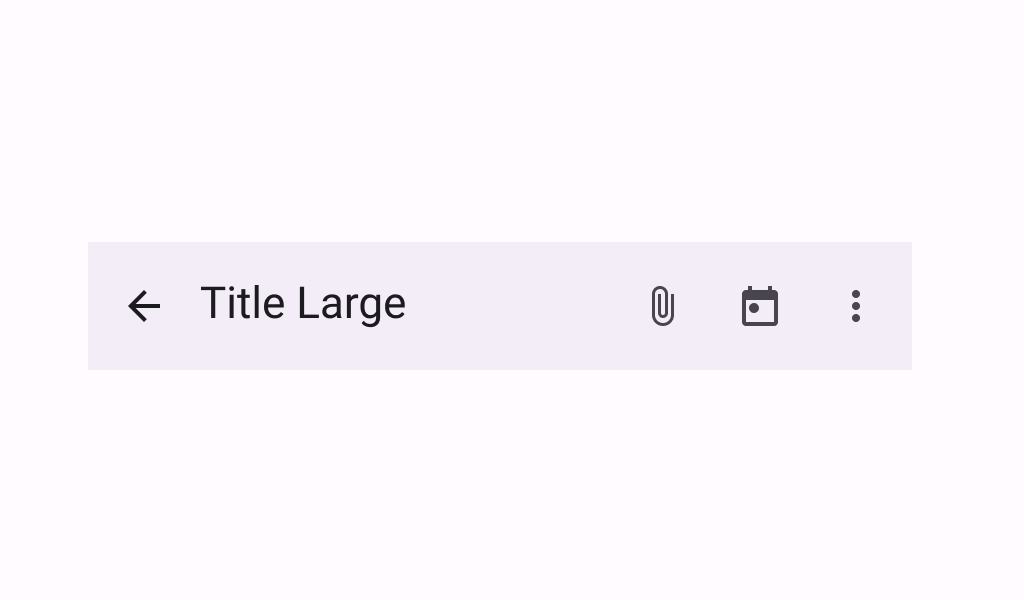

TopAppBar
Source set: Common
@Deprecated(
    message = "Deprecated in favor of TopAppBar with contentPadding parameter",
    level = DeprecationLevel.HIDDEN,
)
@Composable
public fun TopAppBar(
    title: @Composable () -> Unit,
    modifier: Modifier = Modifier,
    navigationIcon: @Composable () -> Unit = {},
    actions: @Composable RowScope.() -> Unit = {},
    expandedHeight: Dp = TopAppBarDefaults.TopAppBarExpandedHeight,
    windowInsets: WindowInsets = TopAppBarDefaults.windowInsets,
    colors: TopAppBarColors = TopAppBarDefaults.topAppBarColors(),
    scrollBehavior: TopAppBarScrollBehavior? = null,
): Unit
Parameters
| title | the title to be displayed in the top app bar |
| modifier | the Modifier to be applied to this top app bar |
| navigationIcon | the navigation icon displayed at the start of the top app bar. This should typically be an IconButton or IconToggleButton. |
| actions | the actions displayed at the end of the top app bar. This should typically be IconButtons. The default layout here is a Row, so icons inside will be placed horizontally. |
| expandedHeight | this app bar's height. When a specified scrollBehavior causes the app bar to collapse or expand, this value will represent the maximum height that the bar will be allowed to expand. This value must be specified and finite, otherwise it will be ignored and replaced with TopAppBarDefaults.TopAppBarExpandedHeight. |
| windowInsets | a window insets that app bar will respect. |
| colors | TopAppBarColors that will be used to resolve the colors used for this top app bar in different states. See TopAppBarDefaults.topAppBarColors. |
| scrollBehavior | a TopAppBarScrollBehavior which holds various offset values that will be applied by this top app bar to set up its height and colors. A scroll behavior is designed to work in conjunction with a scrolled content to change the top app bar appearance as the content scrolls. See TopAppBarScrollBehavior.nestedScrollConnection. |
TopAppBar
Source set: Common
@Composable
public fun TopAppBar(
    title: @Composable () -> Unit,
    modifier: Modifier = Modifier,
    navigationIcon: @Composable () -> Unit = {},
    actions: @Composable RowScope.() -> Unit = {},
    expandedHeight: Dp = TopAppBarDefaults.TopAppBarExpandedHeight,
    windowInsets: WindowInsets = TopAppBarDefaults.windowInsets,
    colors: TopAppBarColors = TopAppBarDefaults.topAppBarColors(),
    scrollBehavior: TopAppBarScrollBehavior? = null,
    contentPadding: PaddingValues = TopAppBarDefaults.ContentPadding,
): Unit
Parameters
| title | the title to be displayed in the top app bar |
| modifier | the Modifier to be applied to this top app bar |
| navigationIcon | the navigation icon displayed at the start of the top app bar. This should typically be an IconButton or IconToggleButton. |
| actions | the actions displayed at the end of the top app bar. This should typically be IconButtons. The default layout here is a Row, so icons inside will be placed horizontally. |
| expandedHeight | this app bar's height. When a specified scrollBehavior causes the app bar to collapse or expand, this value will represent the maximum height that the bar will be allowed to expand. This value must be specified and finite, otherwise it will be ignored and replaced with TopAppBarDefaults.TopAppBarExpandedHeight. |
| windowInsets | a window insets that app bar will respect. |
| colors | TopAppBarColors that will be used to resolve the colors used for this top app bar in different states. See TopAppBarDefaults.topAppBarColors. |
| scrollBehavior | a TopAppBarScrollBehavior which holds various offset values that will be applied by this top app bar to set up its height and colors. A scroll behavior is designed to work in conjunction with a scrolled content to change the top app bar appearance as the content scrolls. See TopAppBarScrollBehavior.nestedScrollConnection. |
| contentPadding | the padding applied to the content of this TopAppBar. |
TopAppBar
Source set: Common
@Composable
public fun TopAppBar(
    title: @Composable () -> Unit,
    subtitle: @Composable () -> Unit,
    modifier: Modifier = Modifier,
    navigationIcon: @Composable () -> Unit = {},
    actions: @Composable RowScope.() -> Unit = {},
    titleHorizontalAlignment: Alignment.Horizontal = Alignment.Start,
    expandedHeight: Dp = TopAppBarDefaults.TopAppBarExpandedHeight,
    windowInsets: WindowInsets = TopAppBarDefaults.windowInsets,
    colors: TopAppBarColors = TopAppBarDefaults.topAppBarColors(),
    scrollBehavior: TopAppBarScrollBehavior? = null,
    contentPadding: PaddingValues = TopAppBarDefaults.ContentPadding,
): Unit
Parameters
| title | the title to be displayed in the top app bar |
| subtitle | the subtitle to be displayed in the top app bar |
| modifier | the Modifier to be applied to this top app bar |
| navigationIcon | the navigation icon displayed at the start of the top app bar. This should typically be an IconButton or IconToggleButton. |
| actions | the actions displayed at the end of the top app bar. This should typically be IconButtons. The default layout here is a Row, so icons inside will be placed horizontally. |
| titleHorizontalAlignment | the horizontal alignment of the title and subtitle |
| expandedHeight | this app bar's height. When a specified scrollBehavior causes the app bar to collapse or expand, this value will represent the maximum height that the bar will be allowed to expand. This value must be specified and finite, otherwise it will be ignored and replaced with TopAppBarDefaults.TopAppBarExpandedHeight. |
| windowInsets | a window insets that app bar will respect. |
| colors | TopAppBarColors that will be used to resolve the colors used for this top app bar in different states. See TopAppBarDefaults.topAppBarColors. |
| scrollBehavior | a TopAppBarScrollBehavior which holds various offset values that will be applied by this top app bar to set up its height and colors. A scroll behavior is designed to work in conjunction with a scrolled content to change the top app bar appearance as the content scrolls. See TopAppBarScrollBehavior.nestedScrollConnection. |
| contentPadding | the padding applied to the content of this TopAppBar. |
